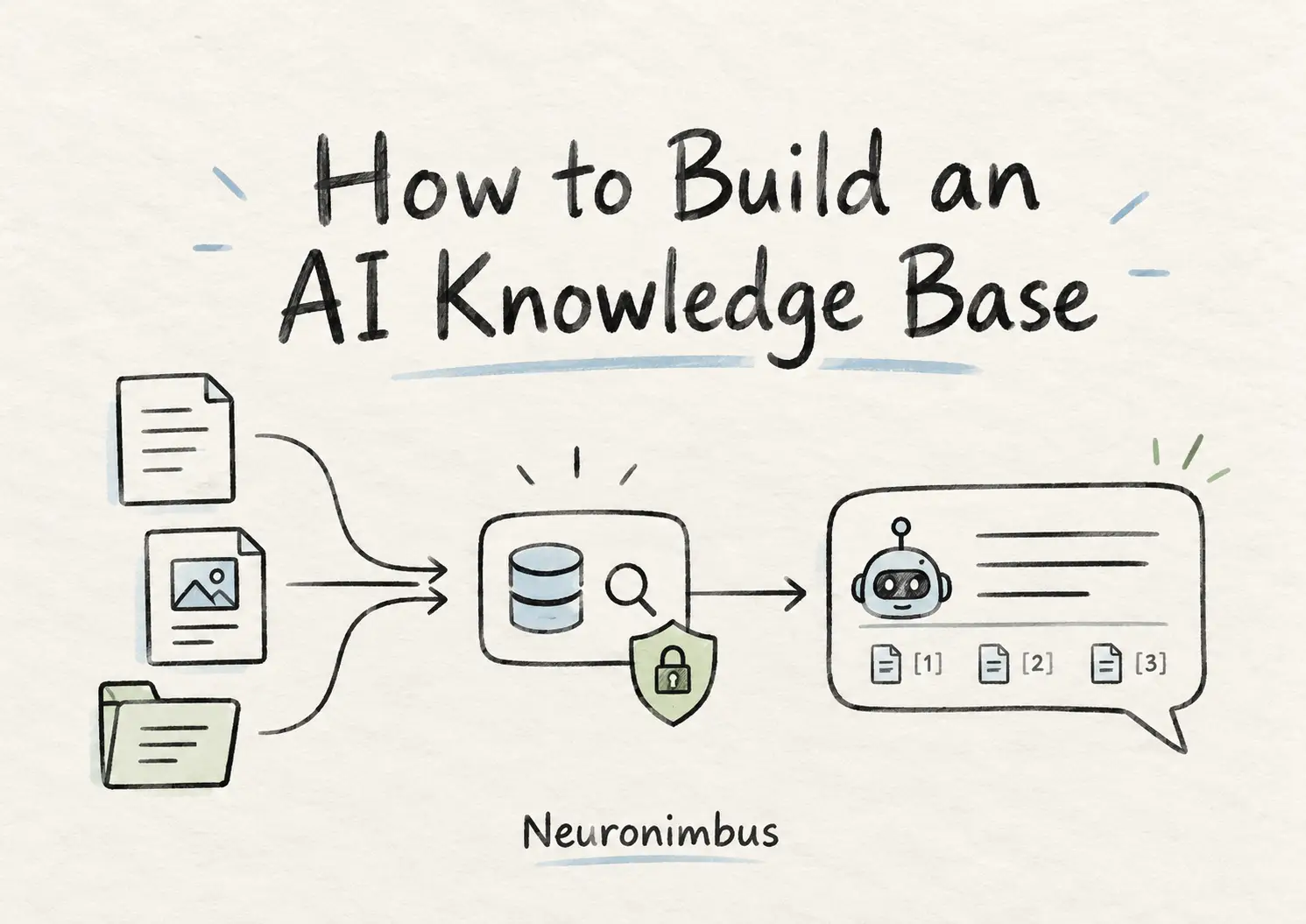
An AI knowledge base is an informational system that stores your company’s documented content (policies, docs, support histories, SOPs), such that an AI system can search through it, find the relevant passages, and answer questions directly from them, with sources attached.
The core technical method behind an AI knowledge base is called retrieval-augmented generation (RAG). Instead of training an AI model on all your company documents, RAG allows the model to search those documents when someone asks a question, find the relevant information, and use it to prepare an answer.
In this guide, I will walk through what an AI knowledge base actually is, how the underlying architecture works, when to use RAG versus fine-tuning, and how to build an AI knowledge base step by step.
Also read: Agentic AI in Customer Service: Use Cases & Architecture
An AI knowledge base is a system that makes an organization's information searchable and usable through AI.
Let’s understand this with an example. Think about how employees find information today. Perhaps someone needs to understand the company's reimbursement policy. They search SharePoint, find three documents, check which one is recent, and perhaps message someone in finance to confirm the answer.
A traditional knowledge base helps a lot by organizing those documents and making them searchable.
An AI knowledge base goes further than that. Once deployed, the system enables users to simply ask questions, such as “Can I claim accommodation expenses if I extend a business trip for personal travel?”
The AI knowledge base will retrieve the relevant policy sections, interpret them together, and provide an answer with links to the documents supporting the information components used to compile the answer.
An AI knowledge base may also not necessarily be a chatbot.
The same knowledge infrastructure can support an internal knowledge base chatbot, an employee portal, a customer-support application, or an AI agent that needs company-specific information before taking action.
The interface can change. The underlying requirement remains the same: retrieve the right information, from the right source, for the right user. And as long as the architecture is right, the resulting system will work as an AI knowledge base.
Also read: How to Train an AI Model for Enterprise Success
Most enterprise implementations of AI knowledge bases use a RAG knowledge base architecture.
The architecture behind a RAG knowledge base follows a specific pipeline, where each stage has a specific job, and when one stage is weak, the whole system suffers, so it is worth understanding what each one does.
Let me explain the basic idea before we look at the individual steps.
An AI knowledge base has two main processes.
The first happens before anyone asks a question. The system collects your company's documents, processes their content, and organizes that information into a searchable index.
The second happens when someone asks a question. The system searches this index, finds the passages most relevant to the question, and passes them to a language model. The model then uses those passages to prepare an answer and cite the original documents.
This is what retrieval-augmented generation means. The model does not have to remember your company's policies from its training. It can look up the relevant information when it needs it.
And when a policy changes, you update the searchable information rather than retraining the language model.
Here is how the two processes connect:
PROCESS 1: PREPARING THE KNOWLEDGE BASE
Company documents, wikis, databases
↓
Collect and process content
↓
Organize content into searchable passages (index)
↓
Searchable AI knowledge base
PROCESS 2: ANSWERING A USER'S QUESTION
User asks a question
↓
System searches the AI knowledge base
↓
Retrieves relevant passages that the user is authorized to access
↓
Passes the retrieved passages and question to the LLM
↓
LLM generates an answer with source references
I am convinced there are as many as six important operations across these two processes.
You connect the knowledge base system to sources such as SharePoint, Google Drive, Confluence, ServiceNow, or internal databases. Then, the system extracts the information needed for searching, along with metadata such as document titles, modification dates, and access permissions.
A 60-page policy document may contain only two paragraphs relevant to a particular question.
Instead of treating the entire document as one searchable unit, we divide it into smaller passages called chunks.
The boundaries matter during the process of this splitting, because if a table is separated from its heading, or an exception is separated from the rule it qualifies, retrieval can produce a misleading answer.
The text is converted into numerical representations that capture aspects of its meaning. This work is done by an embeddings model. These numerical representations are stored in a searchable index. When this is done, the system can find relevant passages even when the employee's question uses different wording from the document.
When a user asks a question, the system runs a hybrid search: dense vector search to capture conceptual relevance, combined with sparse keyword search (BM25) to catch exact terms like product codes or policy numbers. The top results then pass through a re-ranker that scores them more carefully and selects the three to five most relevant chunks.
The retrieved passages are supplied to the LLM with the user's question, and the model uses this context to prepare an answer. Crucially, the system should be designed to acknowledge when the available evidence is insufficient rather than inventing a plausible explanation.
The retrieved, authorised chunks are assembled into a prompt alongside the user’s question. The LLM generates a response using only the provided context, and output guardrails verify that every claim maps back to a source passage. The answer is delivered with inline citations.
Key point: The model does not “know” your company’s information. It reads the retrieved passages every time a question is asked. This is what makes RAG answers auditable and what keeps them current when your documents change.
This pipeline is what turns scattered documentation into an internal knowledge base chatbot that actually resolves questions instead of deflecting them.
This is one of the most common questions we hear, and it has a direct answer: if you are building an AI knowledge base over content that changes, RAG is almost always the right starting point.
The confusion between RAG and fine-tuning comes from a misunderstanding of what each one does.
That said, fine-tuning is not useless. In what cases would you train or tune a model instead of using RAG? When the model already has access to the right facts through retrieval, its outputs need adjustment. For instance, the output needs to be published in strict JSON formatting, a specific corporate tone, while handling domain-specific abbreviations, or using ultra-concise response patterns. In practice, the strongest enterprise systems use both: RAG for knowledge, fine-tuning for behaviour.
The practical approach is a ladder of capabilities:
This difference between RAG and fine-tuning is the single most important distinction to get right before you start building.
Also read: Legacy Application Modernization with AI
I would establish five prerequisites before selecting AI knowledge base software or committing to a technology stack.
Start with a specific user group and business problem. For instance, a knowledge base AI that has to serve as an employee-support assistant will have to serve different requirements from a legal research assistant. So, collect 30–50 representative questions. These will also form the beginning of your evaluation dataset.
List the systems containing relevant information and identify which sources should be trusted.
Most organisations underestimate how fragmented their content is. Policies in SharePoint, procedures in Confluence, tribal knowledge in Slack threads, edge cases buried in Jira tickets. You need a source inventory before you can build a pipeline.
If you feed stale, contradictory, or duplicate documents into a RAG knowledge base, the AI will confidently serve stale, contradictory, or duplicate answers. So, assign document owners, purge expired versions., and consolidate conflicting policies. This is unglamorous work, and it is the highest-leverage thing you can do for answer quality.
Every important source should have an accountable owner. You also need to determine whether existing access controls can be inherited by the new system. HR, finance, and leadership documents cannot become universally accessible merely because they share a search index.
You will need to agree on measurable outcomes before the development of the knowledge base system begins. The outcomes can be as follows:
These prerequisites give the engineering team a clear understanding of what the system must achieve.
I would divide the process of implementing an AI based knowledge base system into seven stages.
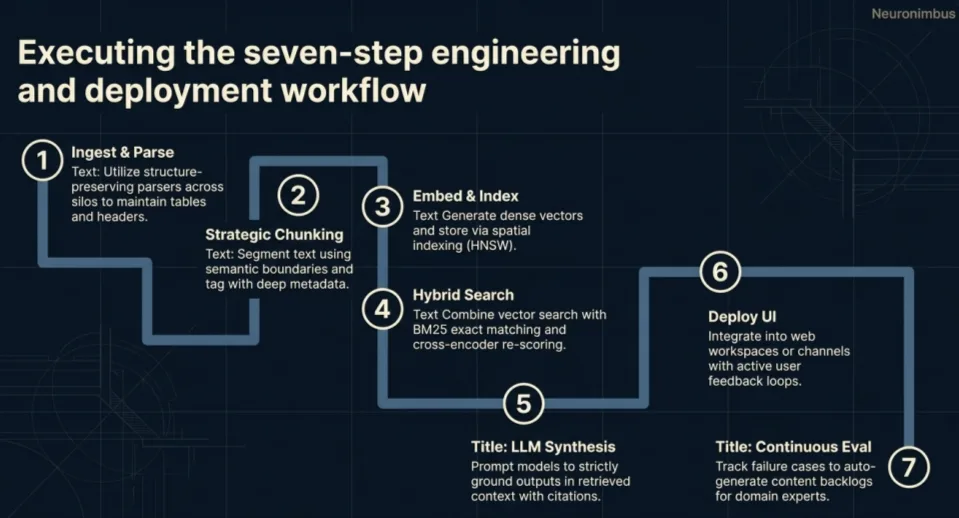
Begin by choosing the initial users, questions, and authoritative repositories. Next, build secure connectors to retrieve content and relevant metadata. Start with a manageable set of sources rather than connecting every enterprise system immediately.
The first deliverable is a reliable, permission-aware inventory of available information.
Now, extract content while preserving headings, tables, lists, and document structure. Split the content into searchable chunks, keeping related rules and exceptions together. Attach source IDs, version information, dates, and permissions to each chunk.
Convert the chunks into embeddings and store them alongside their content and metadata. Choose indexing technology according to document volume, search requirements, existing infrastructure, and operational constraints. Also maintain keyword-search capability where exact terminology matters.
Build the search pipeline that selects relevant passages for each question. You will need to combine semantic and keyword retrieval where useful, then rerank the candidates. Also, apply authorization before restricted content reaches the model. Now, test whether the retrieved passages actually contain the information needed to answer the question.
Connect the retrieval pipeline to the language model. Be careful to provide clear instructions for using retrieved evidence, handling contradictory sources, and declining unsupported answers. Ensure citations identify the passages supporting the response.
Your end users should be able to access the system through an internal knowledge base chatbot, intranet search interface, or existing workplace application. So, choose the interface based on where people already work. Include source links and simple mechanisms for reporting incorrect answers.
Run the prepared test questions through the complete system. Also, check retrieval, answer accuracy, citations, permissions, and response times. Begin with a controlled rollout, investigate failures, and expand only when the system performs reliably.
At the end of this stage, what you should get is a dependable knowledge service that your organization can maintain as its information changes.
Let us take a reasonably common enterprise situation.
A company has about 500 policy and process documents spread across SharePoint, Google Drive, and its internal HR portal.
These documents cover employee leave, reimbursements, IT support, procurement, vendor onboarding, and operational procedures.
Employees regularly ask questions that are already answered somewhere in these documents. The problem is finding the correct answer, particularly when different departments have maintained different versions.
The company wants to build an AI knowledge base that employees can question in natural language.
How much work would that involve?
The number of documents alone does not tell us very much. Their quality, complexity, format, permissions, and rate of change determine the actual implementation effort.
For a reasonably clean set of 500 documents, I would plan the initial implementation along these lines.
Consider an employee asking:
“I am travelling to Singapore for a client meeting. Can I claim accommodation expenses if I stay an extra two days?”
The internal knowledge base chatbot would retrieve the applicable travel policy, identify the rule on personal extensions, and explain which expenses are reimbursable. It should also link directly to the policy section supporting that answer.
Now suppose the employee asks about the travel reimbursement limits applicable to senior leadership. If those limits are restricted to authorized personnel, the retrieval system must exclude them from that employee's search results.
The interface can look almost identical in both situations. What changes is the information the system is permitted to use. That distinction is what separates a basic document-question-answering demonstration from an enterprise implementation.
Also, once people begin depending on the answers, the organization needs a reliable way to keep those answers aligned with changing company information.
A knowledge base is only as useful as the information it can retrieve.
Suppose your finance department changes the reimbursement limit for hotel accommodation from ₹8,000 to ₹10,000.
The policy document is updated in SharePoint, but the RAG knowledge base still contains indexed passages from the previous version.
Employees could continue receiving the old limit even though the official document has changed.
This is why content synchronization needs to be part of the architecture from the beginning.
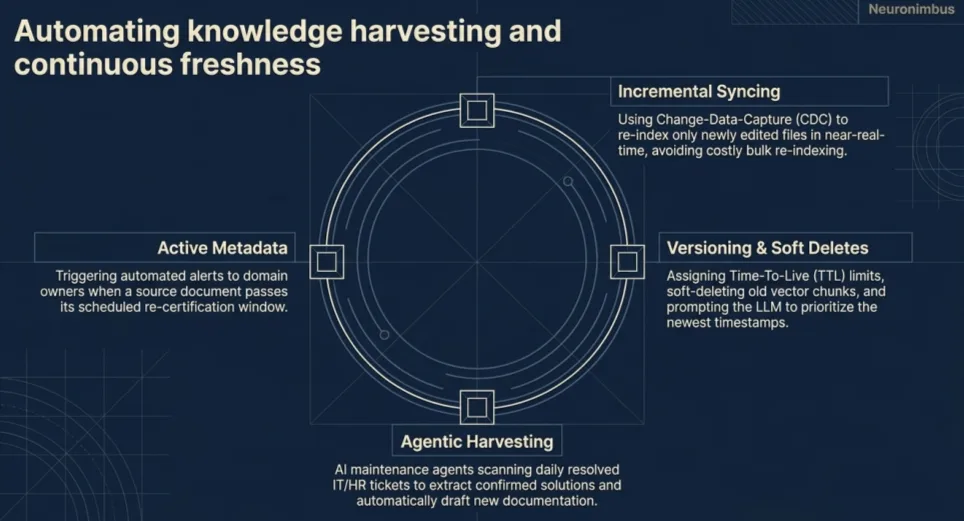
There are three things I would put in place.
Use webhooks or change-data-capture so that when a document is edited in SharePoint or Confluence, only that document gets re-chunked and re-embedded. Full nightly re-indexing is slow, expensive, and unnecessary.
When a document is updated, old chunks should be marked as expired rather than left alongside the new ones. The system should always prefer the most recent version when multiple exist.
Every source document should have a named owner and a review schedule. If a document passes its review window without being re-certified, it should get flagged before it causes a wrong answer.
This is exactly when choosing between RAG and fine-tuning for frequently-changing knowledge becomes a settled question. RAG handles updates in minutes. A fine-tuned model would need retraining.
This is a non-negotiable for any enterprise deployment. An LLM will repeat whatever context it receives in its prompt. If the retrieval layer serves a finance document to someone without clearance, the model will answer from it without hesitation.
Permission enforcement has to happen at the retrieval layer, before context reaches the model.
The two most practical approaches:

I would not evaluate an AI knowledge base simply by asking it ten questions and deciding whether the responses sound convincing. That’s because language models are particularly good at producing convincing answers. That is not the same as producing correct ones.
Instead, we need to test two separate capabilities:
Start with the 30–50 representative questions collected during planning.
For each question, have a domain expert identify the expected answer and supporting source documents. Include straightforward questions, questions requiring information from multiple passages, ambiguous questions, and questions that cannot be answered from the available content.
Frameworks such as Ragas can help automate parts of this evaluation through metrics including context precision, context recall, answer relevance, and faithfulness.
However, automated evaluation should supplement human review, especially for sensitive business questions.
I would also make these tests part of the deployment process.
If a team changes the embedding model, modifies chunking, or updates the retrieval pipeline, the existing evaluation set should run again.
Otherwise, a change that improves one group of questions could quietly make another group worse.
Once the system is live, user feedback and failed queries should expand the evaluation set.
That creates a practical improvement cycle:
Real questions → Measured failures → Root-cause analysis → Pipeline improvements → Retesting
Over time, this is how the system becomes dependable enough for broader enterprise use.
When all the foundations I’ve talked about are in place, the same knowledge infrastructure can support employee search, customer service, internal copilots, and more capable AI agents.
At Neuronimbus, our approach to enterprise knowledge AI focuses on building these capabilities into systems that can operate reliably within existing business environments.
If your organization is ready to move beyond experimentation, we should talk.
Usually, no. A RAG knowledge base can retrieve relevant company documents and provide them to an existing language model without changing its weights. Fine-tuning becomes useful when you need the model to perform a specialized task or follow particular response patterns that prompting alone cannot handle reliably.
An AI knowledge base can use PDFs, Word documents, spreadsheets, company wikis, databases, support tickets, and information from systems such as SharePoint, Google Drive, Confluence, and ServiceNow. The important considerations are whether the content can be reliably extracted, whether its source is trustworthy, and whether access permissions can be preserved.
An AI knowledge base manages the information and retrieval capabilities needed to answer questions. A chatbot is one interface through which users can interact with those capabilities.
You cannot guarantee that an LLM will never produce an unsupported statement. However, you can reduce that risk through reliable retrieval, authoritative sources, grounding instructions, citation verification, and evaluation.
The cost depends on the number and complexity of data sources, document quality, security requirements, integrations, usage volume, and ongoing maintenance.

Let Neuronimbus chart your course to a higher growth trajectory. Drop us a line, we'll get the conversation started.






Call Us

Schedule a Call


Your Next Big Idea or Transforming Your Brand Digitally
Let's talk about how we can make it happen.