If your organization has more than a couple hundred people, perhaps you already know the problem of the access gap between curiosity and knowledge that your employees are grappling with. Sure, the knowledge exists, but it exists in unreachable forms: some of it is in someone's head, a lot in Google Docs, some buried in presentations three folders deep, and quite a lot in a Slack thread from last quarter.
The issue is not that there is a shortage of information but that nobody can find it when they need it.
An enterprise knowledge management system fixes that. It is an information storage and retrieval system that captures what your people know, organises it such that it becomes findable, and delivers it to the right person at the right moment, inside the tools they already use.
I have compiled this guide to walk you through what enterprise knowledge management systems actually are, what features matter most in one, how much does such a system cost, how you can evaluate knowledge management system vendors, and how to roll one out with reasonable confidence of success.
First, let's start with what we're actually talking about.
A knowledge management system is software that collects, organises, and delivers company knowledge to staff. That's the simple version of many definitions of enterprise knowledge systems you can easily find online.
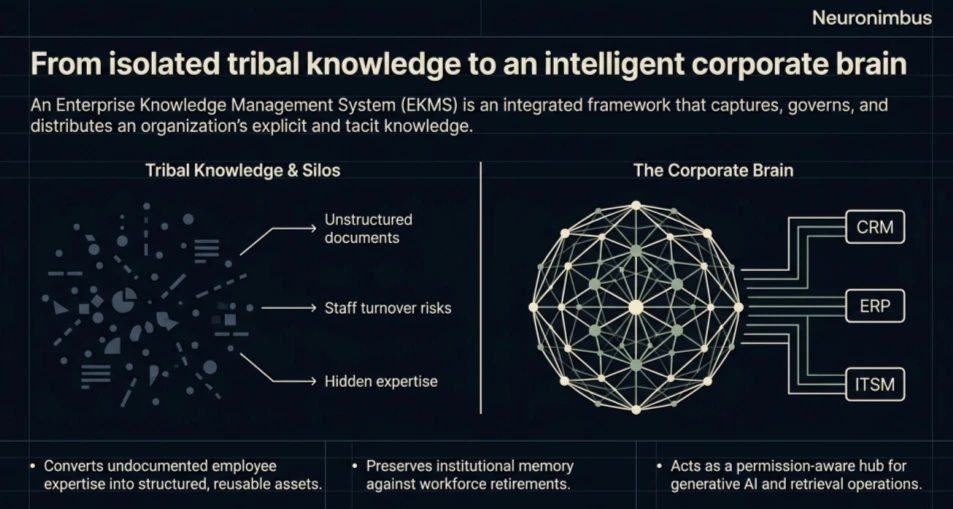
I’ll follow that up with a more precise version. An enterprise knowledge management system is a platform with the capability to turn scattered documents, tribal know-how, and operational data into a single, searchable, permission-aware knowledge base that your entire organisation can rely on.
In my experience, many CTOs engage in a conversation around enterprise knowledge systems without being truly convinced that their organization needs one. So let me share a stat here.
The cost of not having one: In a typical enterprise, knowledge workers spend an average of 1.8 hours every day just searching for information. That's roughly $5,000 per employee per year in wasted time. For a 3,000-person company, that means at $15 million in annual drag.
Now, let’s go back to the definition of enterprise knowledge bases. The definition has actually evolved a lot over the last decade. Primitive enterprise knowledge systems used to be mere document repositories. Today, these systems come with an intelligence layer powered by LLMs. Modern knowledge management systems are equipped with semantic search, structured taxonomies, and retrieval-augmented generation (RAG), which allow them to deliver contextually relevant answers.
In the definition I shared, there are some important phrases:
Once you understand what a knowledge management system does, the next question is what shape does it exist in, inside an enterprise’s IT systems?
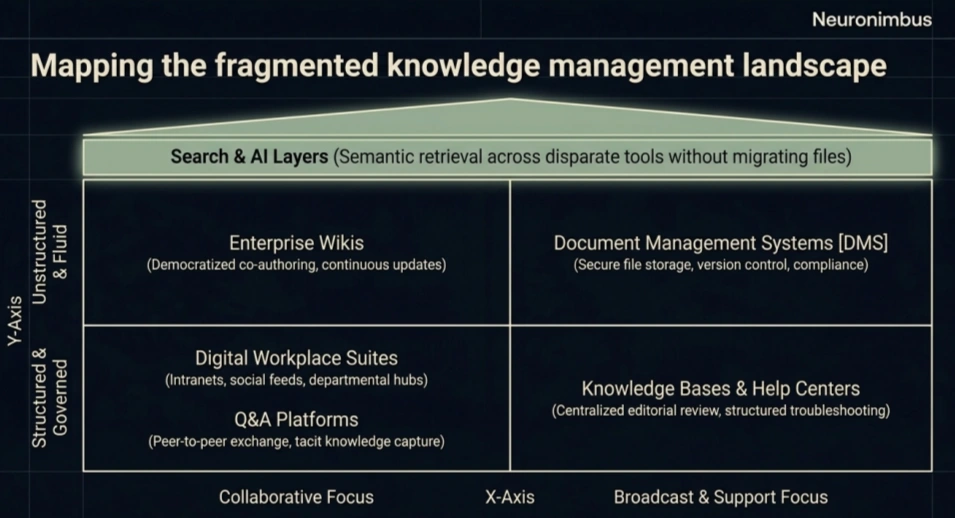
The knowledge management systems market today is fragmented into several categories. Most enterprises end up combining two or more types of knowledge management systems, so it helps to understand what each type does well.
A useful way to evaluate knowledge management system features is to think about how the system should behave and respond when an employee asks a question from it.
Seven capabilities matter particularly for knowledge management systems robust enough to work in an enterprise environment.
The search functionality in traditional knowledge management systems works based on keyword matching. This method of information retrieval can work alright when employees are expected to be aware of the exact terminology used in a document.
But suppose someone searches for “Can we refund a customer if the request has been raised 45 days after delivery date?” The answer to this might be written in a document titled something like ‘Exceptions to Standard Refund Windows’.
If the knowledge management system is equipped with semantic search, it can recognize the relationship between the question and the information in the policy document, even when the wording is not an exact string match.
A good knowledge management software should therefore combine keyword matching, semantic search, filters, and relevance ranking in its search functionality.
Your organisation may have thousands of documents, but not every employee should be able to access every document.
For example, someone in the sales team may need access to product pricing and customer contracts. But that doesn't mean they should also be able to retrieve salary records, board meeting notes, or confidential acquisition plans.
So, your enterprise knowledge management system needs to maintain these boundaries.
There are two important capabilities to look for in an enterprise grade knowledge management system:
Here’s a pattern I’ve seen repeatedly.
A company sets up a knowledge management system. The initial content migration goes well. Six months later, half the articles are outdated, and nobody knows whose job it is to fix them.
The problem is that there’s no assignment of ownership. You should designate a person responsible for keeping every important knowledge asset updated.
Your system should support:
Without ownership, even a well-organised knowledge base will gradually become unreliable. And unreliable knowledge is worse than no knowledge, because people make decisions based on it.
Consider this scenario. An employee finds two versions of your expense reimbursement policy. One says the limit is $500. The other says $750.
Which one applies?
If they guess wrong, either the company overpays or the employee gets a legitimate claim rejected. Neither outcome is acceptable.
This is where version control becomes important.
A good enterprise knowledge management system should maintain a record of changes, identify the current approved version, and prevent outdated documents from appearing as authoritative information.
It should also let employees understand what changed between versions.
Another feature I would pay particular attention to is integration.
Your employees already spend their working day inside applications such as Salesforce, ServiceNow, Microsoft Teams, and SharePoint.
If the knowledge management software requires them to leave these applications and open a separate portal every time they need information, adoption may become difficult.
Ideally, relevant knowledge should be available inside the applications where employees are working.
Once employees begin using the system, you will want to know whether it is helping them find information.
Most knowledge management systems provide basic usage analytics, such as article views and search volumes.
These are useful, but I would look for something more.
Suppose employees search for “customer escalation procedure” 200 times in a month. They receive results, but most of them immediately try another search or leave without opening anything.
That tells you something.
Perhaps the procedure hasn't been documented properly. Perhaps the information exists but uses different terminology. Or perhaps employees are finding an outdated version.
A useful analytics capability should help you understand:
This gives content owners a practical way to improve the system over time.
Finally, let's look at one of the more important developments in knowledge management with AI.
Traditionally, an employee searching for information would receive a list of documents that are likely to contain the information from which they can derive the answer to their question.
An AI knowledge base works differently, in that an employee can ask a question and the knowledge base will publish a direct answer based on the information in those documents.
These are the main KM system features I would consider when comparing platforms.
But features are only one part of the buying decision. You also need to understand what it will cost to deploy and maintain the system.
There isn't one standard price for an enterprise knowledge management system. Many vendors offer a subscription model for their knowledge management system services, and they charge a monthly fee for each user. Other vendors let you buy user licences based on the number of employees, the capabilities included, or the expected usage.
However, you won’t be able to tell which option is more economical based on a comparison of subscription prices.
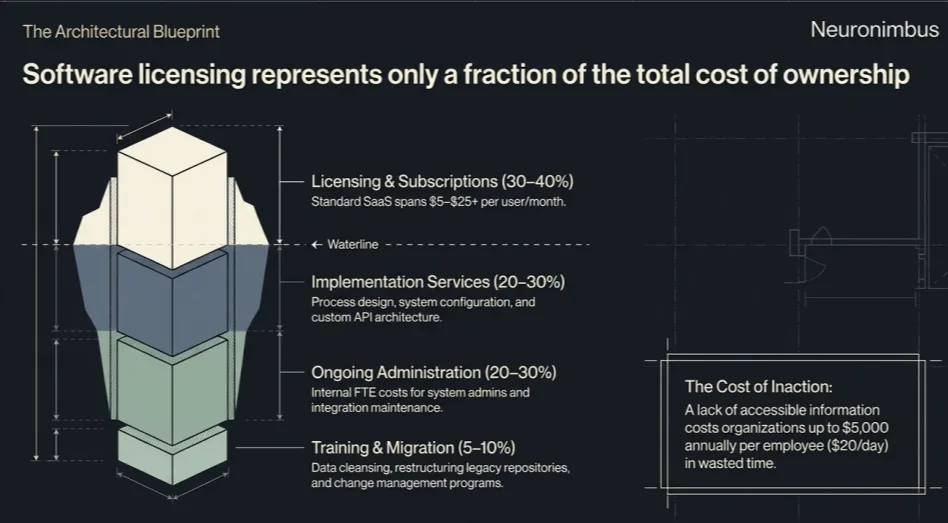
I would suggest looking at the total cost of ownership (TCO) over three to five years.
Here are the costs you should account for.
Once you have a realistic understanding of costs, you can begin comparing vendors against the requirements that matter to your organisation.
Evaluation works best when you separate it into two stages: a process to follow, and a scorecard to score against.
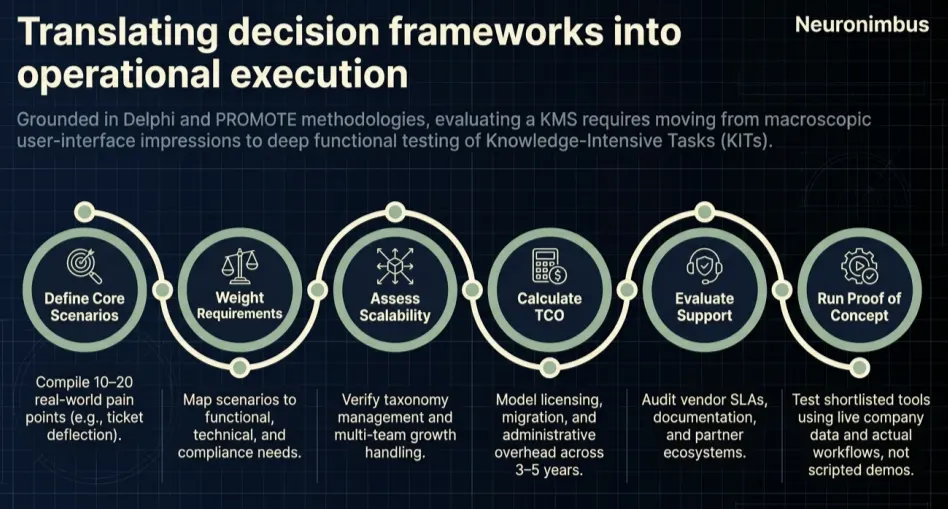
Once that is done, you can use a weighted scorecard to compare vendors more objectively.
The table below gives you a starting point. You can, and you should, adjust the weights according to your organisation's priorities.
Now, suppose your team has shortlisted two vendors. We'll call them Vendor A and Vendor B.
After testing both platforms against your use cases, you can assign each a score from 1 to 5 for every criterion.
This example shows how an objective comparison reveals that vendor A’s solution will perform better on search quality, usability, and cost while vendor B’s solution will perform better on security and integrations.
These capabilities are not equally important, and because of that, in this analysis, vendor B achieves a higher overall score.
Of course, that doesn't necessarily mean Vendor B is the better choice for every enterprise.
For a smaller organisation with relatively simple integrations, Vendor A might be perfectly suitable.
The important thing is that your evaluation should reflect your business priorities.
A good vendor discussion should help you understand not just what the product is capable of, but also its limitations.
Here are ten questions I would suggest asking.
I would also ask vendors to demonstrate the capabilities behind their answers wherever possible.
For instance, if a vendor claims that its AI is permission-aware, give it a test involving two employees with different access rights.
Once you're satisfied with the vendor, the next responsibility is making sure the system works within your organization.
A word of caution: Over 50% of enterprise knowledge management initiatives miss their ROI targets when they are treated as IT projects rather than business transformation projects. On the other hand, another pattern is evident from successful deployments of enterprise knowledge management systems: 80% of effort should go into design and change management, and 20% into maintenance.
I would suggest you manage your rollout through these five stages.
Begin with a content audit, because your team needs to identify where employees currently store and exchange information. That might include SharePoint, Google Drive, Slack, Salesforce, internal wikis, and departmental file servers.
But don't simply prepare a list of repositories. Instead, try to understand which sources contain reliable information, which are outdated, and which are used most frequently.
Simply moving all those documents into a new platform without reviewing them would simply reproduce the existing problem.
Once you know what information exists across the landscape, you have to decide who will be responsible for maintaining it. At this stage, you also need to establish an approval mechanism for change management for these information sources. You will also think about the frequency at which the documents should be reviewed, and what should happen when information in the documents becomes outdated.
Once the knowledge ownership and governance processes are put in place, you can start the technical implementation. This stage will include activities such as setting up user authentication, access permissions, connectors, search indexes, and content structures. If you're implementing knowledge management with AI, this is also when you need to configure retrieval, source citations, and permission checks.
Do not launch the platform across your entire organisation. Instead, begin with a team that has a clear knowledge management problem.
Give the team access, observe how they use the system, and ask where they encounter difficulties.
You might discover that the search works well but employees find the document categories confusing. Or the information may be accurate, but employees still prefer asking colleagues because the new system isn't accessible from their usual applications.
These are problems you can and must address before a wider launch.
Once the pilot is running, compare its performance against the baseline you established before implementation.
I would focus on a few measures.
If these measures are improving, you have a reasonable basis for expanding the rollout.
If they aren't, investigate the underlying causes before introducing the platform to more teams.
An intelligent layer powered by LLMs on top of your knowledge management system can be powerful. By that, I mean a modern enterprise knowledge management system with AI on top of it. I do not mean using LLMs as an alternative to your knowledge management system.
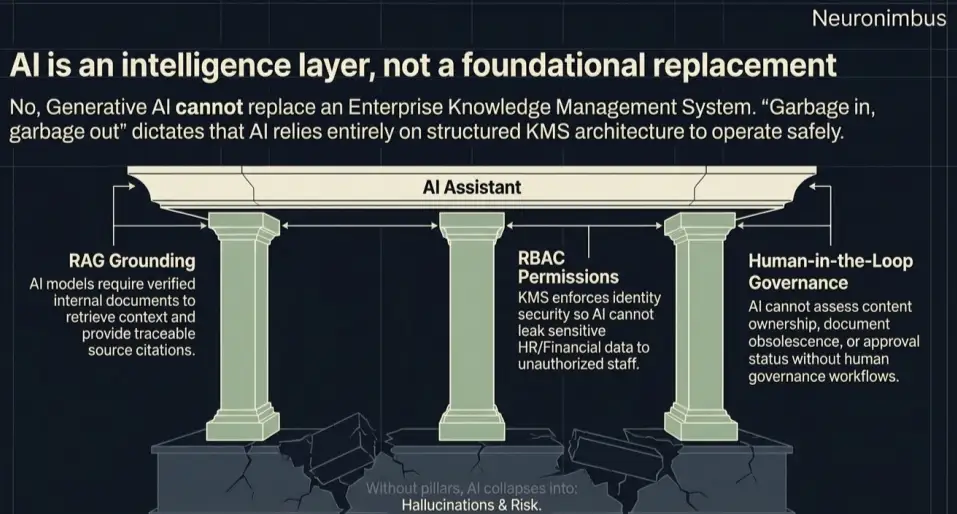
Let me explain the distinction.
A large language model doesn't automatically know your company's refund policy, employee handbook, customer escalation procedures, or the latest changes to your internal processes. It can only give dependable answers about these subjects if it can access reliable information.
That's where your enterprise knowledge management system comes in.
Suppose an employee asks an AI assistant: “Can I approve a refund above $10,000 for this customer?”
The assistant might retrieve an old refund policy, a newer regional exception, and an email discussing a proposed policy change.
Now, which of those should it use? The answer depends on information that must be managed outside the model itself.
Someone needs to establish which policy is approved, which version is current, and who is authorized to access it.
Modern AI assistants commonly use retrieval-augmented generation (RAG) to find relevant company documents and provide them as context to a language model. However, RAG doesn't automatically establish whether a document is correct or current. That reliability depends on the knowledge management processes and systems around it.
This is why I see enterprise knowledge AI as an extension of enterprise knowledge management, rather than its replacement.
If you're evaluating platforms or building the business case internally, our enterprise knowledge AI practice can help you scope, select, and deploy the right system for your environment.
An intranet is used for internal communication, employee resources, company announcements, and related services. A knowledge management system focuses on organizing, maintaining, and retrieving company knowledge.
It depends on how you want employees to create and maintain information. A wiki is suitable for collaborative documentation that changes frequently, while a knowledge base often provides more structured publishing and review processes.
A focused pilot using existing integrations may take several weeks, while an enterprise-wide deployment involving migration, custom integrations, and governance changes may take several months or longer.
AI can make it considerably easier for employees to search, summarize, and use organizational information. However, it still depends on reliable knowledge sources, appropriate permissions, and processes for maintaining accurate content.
Knowledge management system costs vary depending on licensing, user numbers, integration requirements, and AI capabilities.

Let Neuronimbus chart your course to a higher growth trajectory. Drop us a line, we'll get the conversation started.






Call Us

Schedule a Call


Your Next Big Idea or Transforming Your Brand Digitally
Let's talk about how we can make it happen.