An AI chatbot built specifically for customer service can answer customer queries and also perform actions related to customer support, based on permissions granted to it. To set such a chatbot up, the high level approach will be such where you have to choose the chatbot’s scope of work, prepare what level of business knowledge it can access from live databases, define its limits, test it based on realistic conversations, and launch it to a small audience before you either roll it out to more customers or expand its capabilities.
Purely from an academic point of view, this might sound straightforward. However, from what I’ve seen my team develop for top organizations in the past 10 years, I can confirm that each decision you take demands attention, and most of these decisions are not straightforward.
Let’s consider an example. A customer might ask your AI chatbot, “Where is my order?”. The chatbot will need a lot more to answer this question satisfactorily. First, it must understand the meaning of the sentence. Then it must identify the customer. Then, it has to find the relevant details from the order in question. Then it has to check its status. Then it has to explain that status to the customer, without inventing any information, and without making any promise based on absent information or improper assumptions.
So, let’s step back a little, and try to approach customer service AI chatbots with a sense of curiosity, and with a sense of clarity that such a chatbot is not just like ‘any other chatbot’ and that the AI element of it has to enable the chatbot not only to answer queries, but to take actions.
Also read: Agentic AI in Customer Service: Use Cases & Architecture
An AI chatbot for customer service is a system that can understand a customer’s request, use the information available to it and respond within the responsibilities you have assigned to it. Depending on how you build it, that response could be an explanation, a request for more information or an action in a connected business system.
The distinction is important, because two chatbots can appear similar on your website while having very different capabilities behind them.
A rule-based chatbot (and it’s not an AI chatbot) follows paths you have already defined. You might ask the customer to select “Returns”, then “Damaged item”, after which the chatbot displays the relevant instructions.
With conversational AI for customer service, the customer can describe the problem in their own words. They might say, “The replacement product arrived this morning, but this one is damaged too.” The system needs to recognise the issue and preserve the detail that this is already a replacement.
What happens next depends on the capabilities of the AI chatbot:
You therefore need to be specific about what you mean when you say you want an AI chatbot. The useful starting point is deciding which customer problems it should take responsibility for.
Also read: Revolutionizing Tech: AI Chatbots as Cognitive Aides
I would begin by looking at the conversations your support team already handles.
Which requests come up repeatedly? Which of these have clear resolution paths? And where does an experienced employee need to exercise judgment?
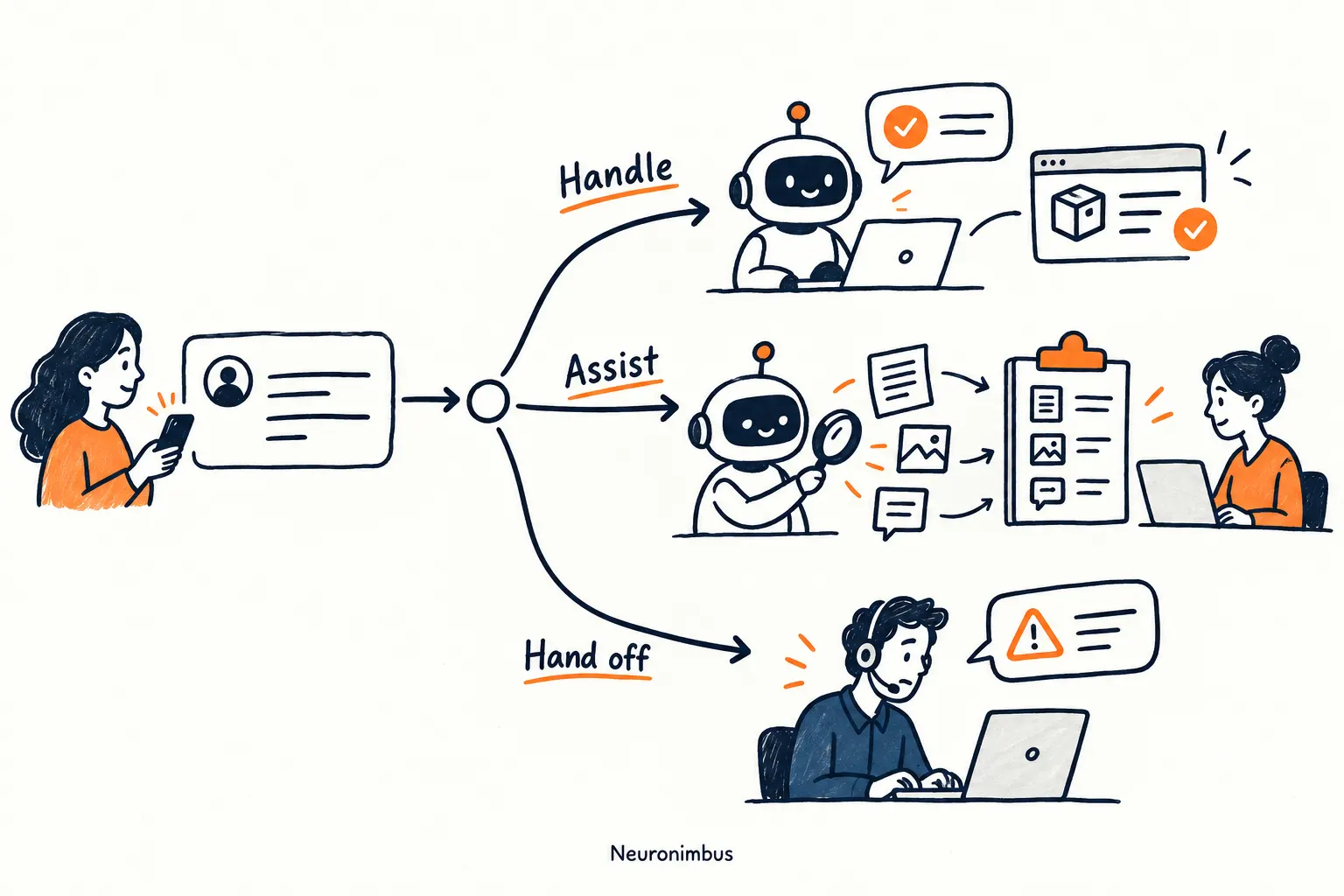
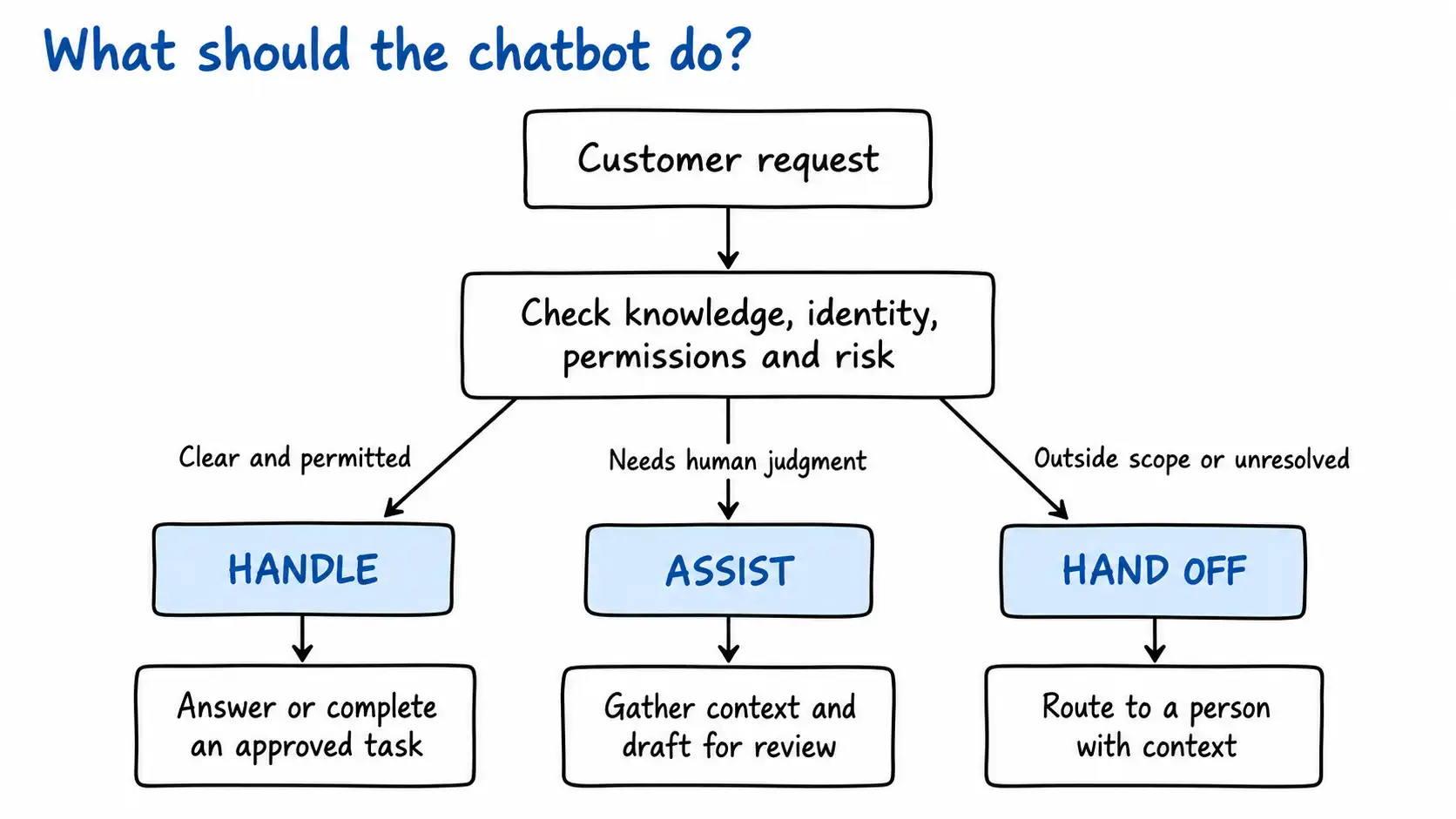
These questions help you decide how much responsibility to give your AI customer service chatbot.
For example, an AI chatbot can be expected to easily explain your standard delivery policy, if the policy itself is current and unambiguous. To explain why a particular customer’s delivery has failed, the chatbot will require access to live information. To decide whether the customer qualifies for compensation, the chatbot requires additional authority.
They are all questions related to delivery, but an AI chatbot will need very different capabilities to address these questions.
Also read: Choose the Right AI Development Company for Growth
To set up an AI customer service chatbot, your team will need to progress through seven phases. These phases can seem to be fluidic, and one might blend into the other. So, it makes more sense to define an output or outcome that should mark the completion of each phase.
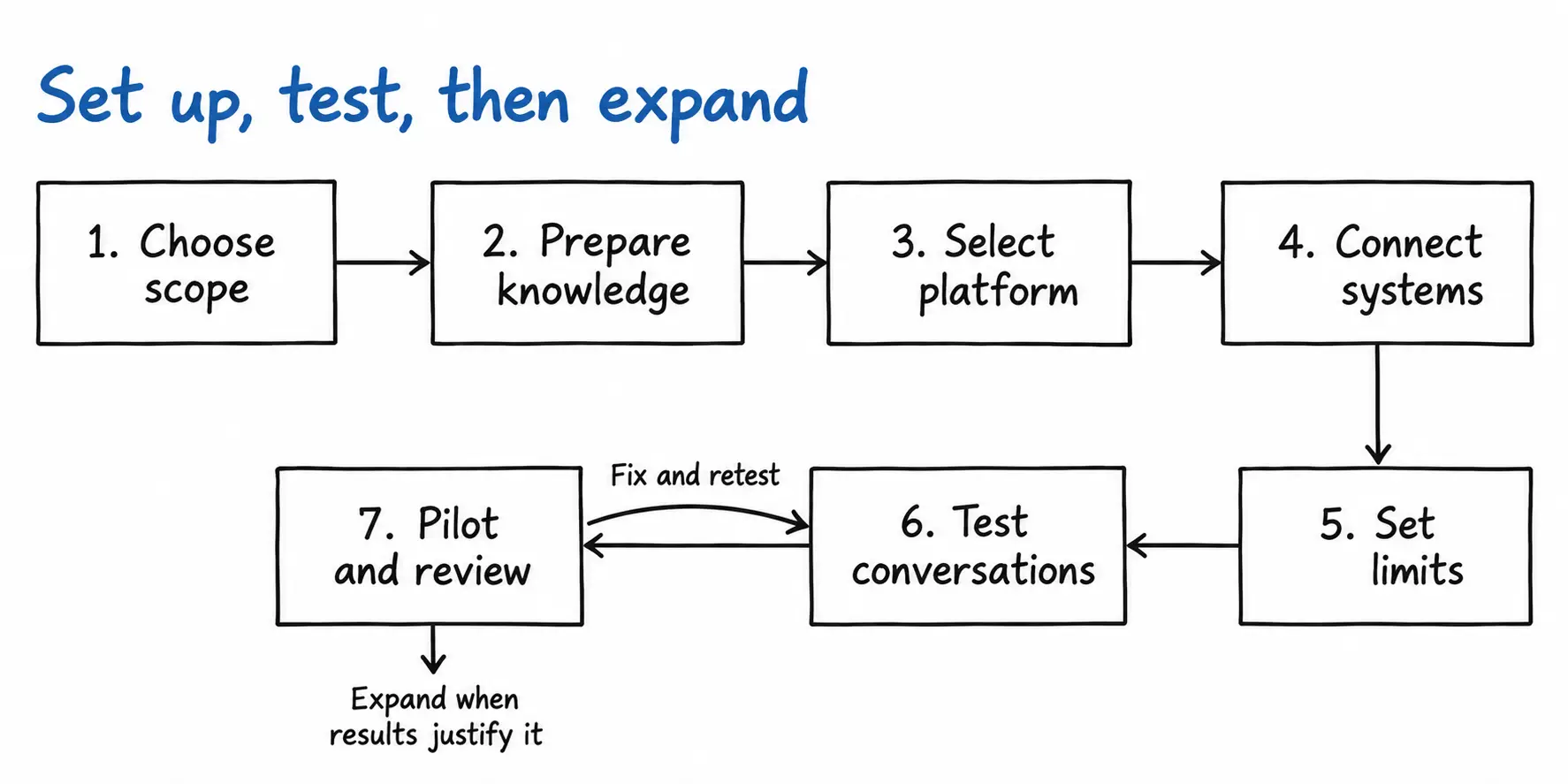
The first step should always be to review your customer support tickets. In your position, I would look for questions that:
Then pick an initial scope of work that your team can document and test thoroughly. For instance, you could decide to set up a customer service AI chatbot only to handle questions and perform actions related to order tracking and standard returns.
Once done, write down what success would literally mean for the AI chatbot. For instance, if you want an AI chatbot to free up your customer support personnel’s time, and its scope of work is only order tracking, then the project’s success could be defined as ‘all customer queries related to order status to be answered by the chatbot, answered correctly’.
Output: a one-page scope document listing the tasks included in the AI chatbot’s scope of work, and the success measure for each.
Once you know what the AI chatbot has to do, identify the business information it will need to do that work correctly.
For an AI chatbot meant for the order tracking and standard returns process, this information will include:
At this stage, your team should check whether the available information is complete, current and consistent.
For example, if the ‘returns policy’ page on your website says that customers can return a product within 30 days, but an internal support document says 14 days, this difference must first be resolved by the relevant business owner. If both the sources are given to the chatbot, it will not be able to make the correct decision.
Of course, your AI chatbot may use retrieval-augmented generation, or RAG, to find relevant passages from approved documents. However, RAG can only enable the chatbot to retrieve the information from the sources made available to it. RAG will not help the chatbot decide which of two contradictory policies (in our example above) your business intended to follow.
Output: an approved list of knowledge sources, with an owner and review date assigned to each source.
You can now assess whether an existing customer service platform can support the AI chatbot or whether you need a custom-built solution.
This decision should follow the scope you have already defined for the chatbot.
Ask each platform provider to show how its platform would handle one of your actual use cases. If your chatbot must track an order, ask the provider to demonstrate:
You can expect an existing customer service AI chatbot platform to work well for standard customer support processes. But you may need a custom AI chatbot solution if the bot will require organization-specific rules or will have to work across systems for which ready-made connectors are unavailable.
Output: a documented platform decision that shows how the selected option meets the chatbot’s functional, integration, security and reporting requirements.
For each task within the chatbot’s scope, identify where the necessary information is stored.
An AI chatbot supposed to help with an order-status request, for example, will need access to the customer account system, order management system and delivery partner’s system. Your team must decide what information the chatbot can read from each one.
If the chatbot is also expected to perform actions, you need to think about permissions. For instance, the chatbot will need permission to read a customer’s delivery address, as well as the permission to change the address. These are two different capabilities, with different risks.
Output: an integration map that lists every system the chatbot needs to be connected with, the information it is allowed to access and exchange, and the read or action permissions it can be granted.
Now define how the AI chatbot will handle the conversation with a customer, from the customer’s first message to an outcome.
The conversation will include the questions the chatbot should ask, the information it must verify and the circumstances in which it must stop.
For example, if the customer asks, “Where is my order?”, the chatbot should first identify the customer and the relevant order. It should then retrieve the latest confirmed shipment status and explain it in plain language.
If the shipment system is unavailable, the chatbot should say that it cannot retrieve the live status. It should not present the standard delivery period as if it were an update about that particular order.
At this stage, you also need to define situations when a customer must confirm an action, when an employee must approve a request, and when the conversation must be transferred to a human expert.
Output: a conversation and escalation guide that covers normal conversational journeys, and situations that involve unavailable information, prohibited actions and human handoffs.
The next phase is about testing the chatbot on the situations customers will actually create for it.
Begin testing for cases where the questions are clearly worded, and the answers to it are based on information that the chatbot already has access to.
Even more important than the above are the negative tests, where a customer may give the wrong information, mention several queries in one session, change their request midway, or ask for exceptional treatment.
You should also test how the chatbot behaves when:
Check the result inside the connected system as well. If the chatbot says that it changed an address, your team should confirm that the correct address was actually saved against the correct order.
Output: a test report recording each scenario, expected result, actual result and unresolved issue.
Once the chatbot has passed the tests, it is ready for launch.
During this pilot, assign people to review conversations between customers and the chatbot, investigate failed actions and correct inaccurate information that may have caused the bot to pass on wrong information to customers. Give the team the ability to pause a capability if the chatbot begins producing incorrect outcomes.
You can roll out the chatbot to a larger audience, or expand the capabilities of the chatbot to cover more tasks only when the pilot shows that the current scope works reliably.
Output: a pilot performance report and a recorded decision to improve, expand or pause the implementation.
To answer a customer's question about an order, your AI chatbot for customer service has to read data from your CRM, your order system and your delivery provider. In this section, I will explain how to connect them, how to limit what the chatbot can do with each, and what to do when a connection fails.
You have three main options: native connectors, middleware, and custom APIs.
Native connectors simplify standard helpdesk workflows. Middleware coordinates several systems at once. Custom APIs give you the most flexibility when your business logic fits neither.
The controls you need depend on what the chatbot is allowed to do:
Now imagine a case wherein a customer requests an AI chatbot to generate a return label so that the customer can use it to return a product. The chatbot requests the return label, the request is sent to the order management system, which generates a return label, but the connection between the chatbot and the order management system times out at that point. Now, the return label exists, but the chatbot doesn’t know it, so it repeats the request. Within such a setup, where the chatbot is not designed for failed and repeated requests, the customer could end up with two return labels for one order.
To prevent this, a common technique we use at Neuronimbus is to attach a unique operation identifier to each request issued by the chatbot, so that the order system has a mechanism that can allow it to recognize a repeat request.
When the chatbot transfers a customer to a human agent, it should brief the human agent on:
Begin with a strict definition of resolution.
You can not deem a conversation as resolved merely because the customer stopped typing or because the chatbot did not transfer them to an employee. The customer may have abandoned the conversation and contacted you later by email or phone.
Here is a simple example.
Suppose your AI customer service chatbot handles 1,000 eligible order-tracking conversations during a pilot.
It transfers 300 conversations to your support team. The other 700 end without a transfer.
You can say that the handoff rate is 30%. You cannot yet say that the resolution rate is 70%.
When you review the remaining conversations, you find that:
On that basis, the verified resolution rate is 55%, not 70%.
If 200 customers answer your satisfaction survey and 160 provide a positive rating, CSAT is 80%. You should report the 20% survey response rate alongside it.
You also need to compare similar support work.
If your chatbot handles straightforward order-status enquiries while employees handle lost parcels, disputed deliveries and damaged products, you cannot compare their raw resolution rates as if they are doing the same job.
Please remember that the purpose of measurement should not to prove that the chatbot was a good decision. It should be to identify which customer problems it resolves well, which ones still need redesign and where a person provides the better service.
Start with a support problem you can measure
If you are planning an AI chatbot for customer service, choose one problem your team already understands well. Establish the baseline, prepare the information and define what a successful resolution looks like.
At Neuronimbus, we've found that the best results come from bringing conversation design, software integration and operational ownership together rather than treating them as separate projects. If that is the approach you are considering, you can explore our AI chatbot development service.
And if your organization is ready to move beyond experimentation, we should talk.
The set up time depends on how ready your knowledge, workflows and integrations are. A chatbot that answers questions from a small, approved knowledge base can be implemented faster than one that authenticates customers, retrieves live records and performs actions across several systems.
When you compare different implementation approaches from a cost POV, account for platform or model usage, system integrations, security controls, conversation monitoring, knowledge updates and ongoing technical maintenance. When comparing providers, make sure each estimate covers the same use cases, customer volume and level of integration.
It can. That might happen because the retrieved information is outdated, relevant context is missing or the policy has been misread.
Yes. These platforms offer AI support and human escalation capabilities, though exactly what is available depends on your product, edition and configuration. Before you choose between a native implementation and a separate chatbot, check your requirements for authentication, live data, permitted actions, routing and reporting.
Set explicit triggers, such as a customer request, an unresolved issue or a task outside the chatbot's authority, and route the conversation to the right queue. A good handoff preserves the transcript, the verified customer details and the attempted actions, and tells the customer what happens next.

Let Neuronimbus chart your course to a higher growth trajectory. Drop us a line, we'll get the conversation started.






Call Us

Schedule a Call


Your Next Big Idea or Transforming Your Brand Digitally
Let's talk about how we can make it happen.