Chances are your team is already experimenting with AI agents today. And I am quite sure that you get at least a dozen proposals a month, for demos of ‘the next best agentic AI platform’.
Agentic AI is exciting.
You can give an agent a goal. You can connect a few tools and watch it plan its way through a task and hopefully perform it well enough. Particularly in a controlled environment such as a demo by a vendor, agentic AI workflows can look remarkably capable.
But for a leader in IT, the challenging question is: Would you trust the same agent to perform that task 10,000 times inside your business?
Now all of a sudden you have to think about permissions, incomplete data, API failures, latency, cost, and the consequences of actions that cannot be undone. You would also need to know why the agent will make a particular decision and what will happen when it reaches a situation you did not anticipate.
This is where the design of AI agentic workflows becomes important.
If you want AI agents to perform in production, you need more than a capable model. You need an architecture that puts boundaries around the agent’s autonomy, preserves state, observes what it is doing and gives people control at the points where control matters.
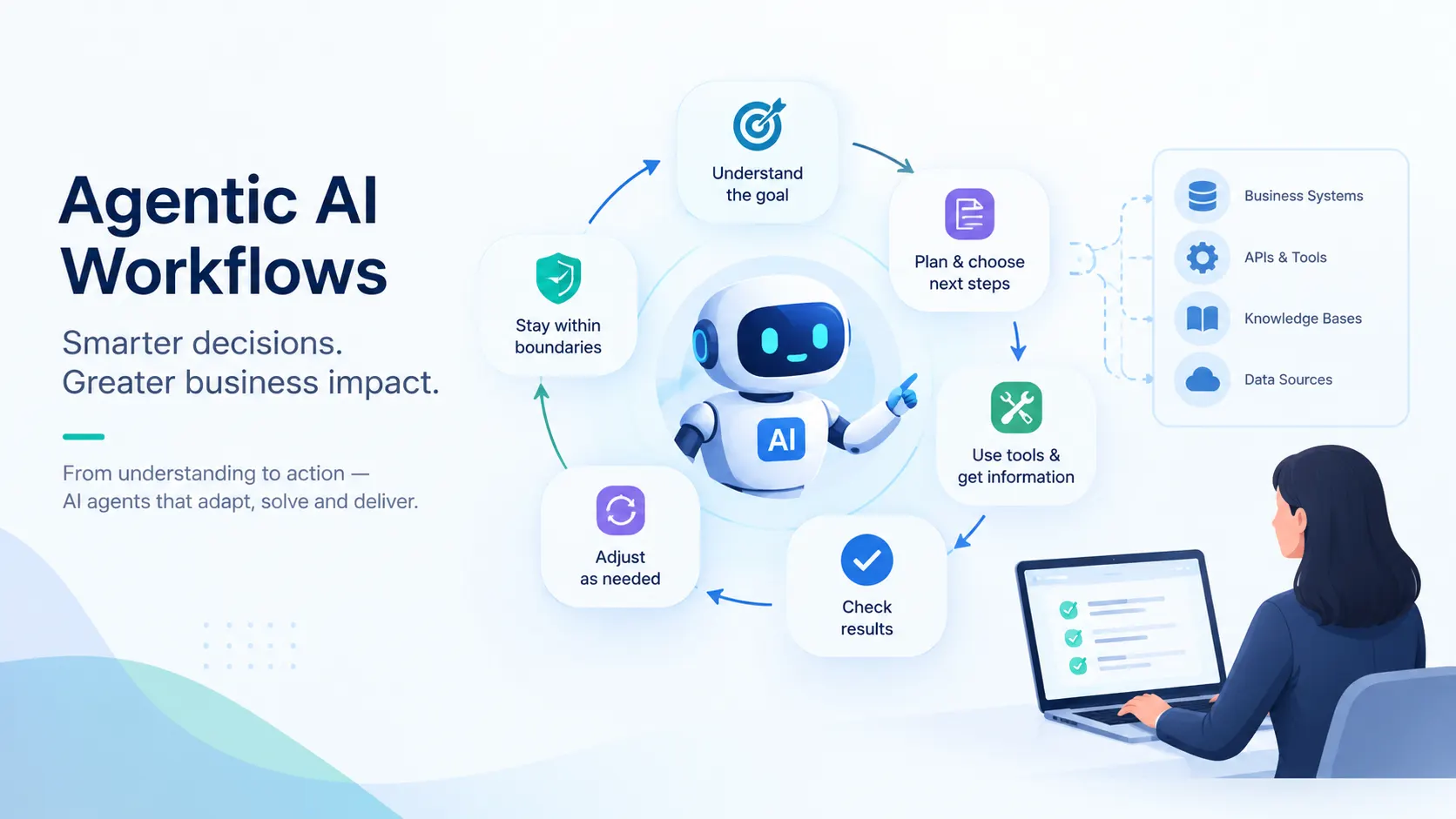
If you give an AI system a goal and it can work out the intermediate steps, select tools, act on the intermediary results, and adjust its next step, you are essentially operating an AI agent.
But there is an important distinction here.
An AI agent is the reasoning and execution unit of a workflow. An agentic workflow is the complete path of actions primarily managed by one or more AI agents.
For example, imagine you want an AI agent to handle an IT support request. The agent might read the ticket. It might then inspect the user's account. It will certainly query relevant policies. Then it might decide that to resolve the user’s problem, it needs to change the privilege level of an access permission.
In this example, it is evident that the workflow has a bigger job. It must have rules that instruct the agent on whether it is permitted to make that change, whether human approval is required, how the action is recorded and what will happen if the identity system returns an error halfway through execution.
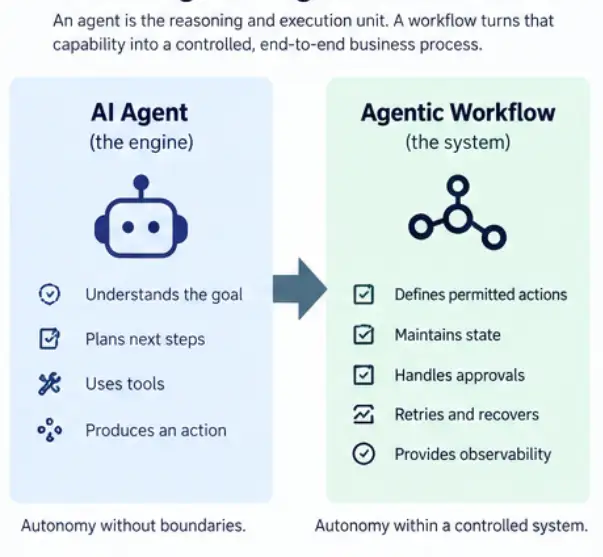
That is the practical difference between AI agents and agentic workflows.
Also Read: Agentic AI in Customer Service: Use Cases & Architecture
Whenever you evaluate an agent pilot, ask yourself two different questions.
Can it complete the task?
Then ask: Can I depend on it to complete the task safely when the environment is no longer controlled?
Those questions may sound similar but in practice, they lead to very different engineering work.
Suppose you are building an agent to process customer refunds. In your pilot, you can give it complete order records and stable APIs. The agent will check the order, read the refund policy and make the correct decision.
Now imagine it working in production.
One customer's record may be incomplete. Another customer’s order may have two conflicting order statuses. Your payments API might time out after receiving the refund request, and in that case the agent will not know whether the transaction was completed.
The comparison above shows the gap you have to close when building production AI agents.
Of course, you cannot eliminate every uncertain decision made by an LLM. If you did, you would remove much of the reason for using an agent in the first place.
What you can do is make the surrounding system deterministic.
You can define:
Once you think about AI agents this way, many agentic workflow failure patterns become solvable architecture problems rather than mysterious black boxes.
Also Read: Enterprise Agentic AI Strategy Guide for CTOs & Leaders
When you design an agentic workflow architecture, you should separate two things: what the model decides and what the system controls.
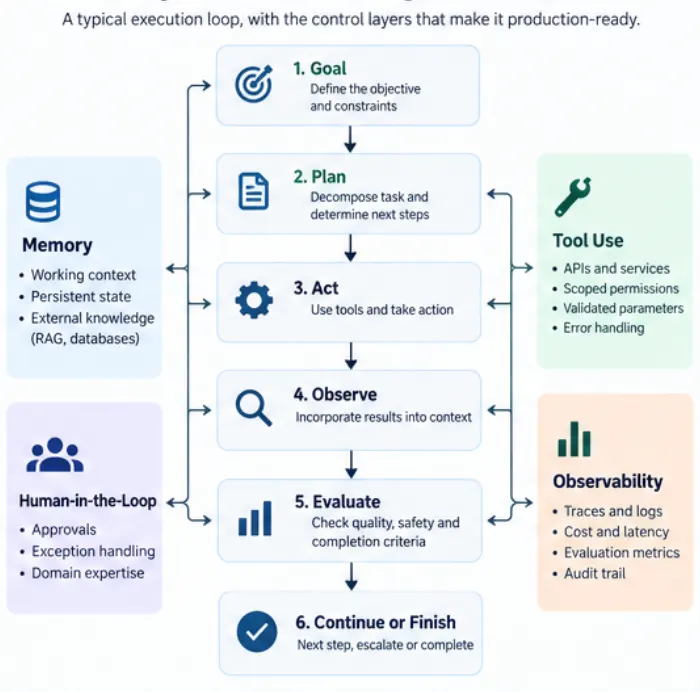
At its simplest, your execution loop may look like this:
Goal → Plan → Action → Observe Result → Evaluate → Continue or Finish
But I would not put that loop into production on its own.
Around it, you need:
permissions + state + observability + recovery + human oversight
Enterprises use different AI agent workflow patterns to arrange these pieces differently. I endorse and recommend four capabilities that should be the beating heart of an agentic workflow that runs in production.
Start with the goal you are asking the agent to achieve.
Suppose you ask an agent to investigate why sales for a product have fallen. You do not necessarily want to hard-code every analytical step. You may want the agent to decide that it should retrieve sales data, compare periods, inspect inventory, examine campaign activity and investigate anomalies.
So, for a bounded problem, you can keep the planning layer inside one agent that should be tuned to use a reasoning-and-action loop or a plan-and-execute pattern. The advantage of this approach is that the planning agent will retain the context behind all of its earlier decisions.
Also, you should not confuse a longer reasoning chain with a better workflow. As the context grows, token consumption and latency will increase, and important instructions and earlier observations will become increasingly harder for the model to retain reliably.
So when you are pondering how to design an agentic AI workflow, ask a question: What decisions need AI reasoning, and what can remain deterministic?
The tools an AI agent can use in a workflow are important as model selection.
You can easily give an AI agent access to tools to query SQL, retrieve a document, update Salesforce, create a service ticket or call an internal pricing API.
However, you should not give every tool to every agent simply because you can. If an agent has 40 available functions, it has a larger tool-selection problem than an agent given five relevant tools.
If you are building a pricing agent, give an AI agent the pricing capabilities it needs to do its job. Do not give it broad CRM administration rights.
For agentic AI workflow design, I would treat tool calls like production APIs: you should require explicit schemas, validated parameters, scoped credentials and clear handling for every meaningful failure response.
That makes the agent's actions easier to constrain and much easier to debug.
You also need to decide what information the agent needs during a workflow, where that information should live, and how long it should remain available.
The agent’s working context should contain the information it needs for the current reasoning cycle. This may include the user’s objective, outputs from previous steps, tool responses and instructions relevant to the current task.
But this context window should not become the system of record for the workflow.
For example, suppose an agent prepares a payment request and the workflow then waits six hours for a manager’s approval. The workflow should persist the current execution state outside the LLM context. That state may include the completed steps, the pending approval, relevant transaction data and the point from which execution should resume.
This is different from long-term knowledge. Information such as enterprise policies, historical cases or domain knowledge may be brought into the context only when required.
Keep working context, workflow state and long-term knowledge separate, as this approach makes the workflow easier to resume, audit and scale.
Finally, you need to know whether the workflow is actually doing its job well. Do not make every evaluation an AI evaluation.
If an output must conform to JSON, validate the schema. If an API operation must return a particular state, check it programmatically. If a calculation has a deterministic answer, test the answer directly. Use model-based evaluation where judgement is genuinely required.
Evaluation also needs to continue after deployment.
You should be able to trace:
Without that visibility, you may have an autonomous system, but you do not yet have an operable one.
Once these foundations are clear, you can make the next architecture decision with much more confidence.
Also Read: AI-Native vs AI-Enabled: 4 Levels of AI Maturity for Leaders
Once you know what the workflow needs to do, there is a temptation to divide it among multiple specialist agents.
I would recommend you resist that until you have a reason.
A single-agent architecture gives one agent ownership of the task trajectory.
A multi-agent architecture distributes work. An orchestrator agent might break a goal into tasks and send them to specialist agents for research, pricing, compliance or another domain. Those workers can run independently or in parallel before their outputs are brought together.
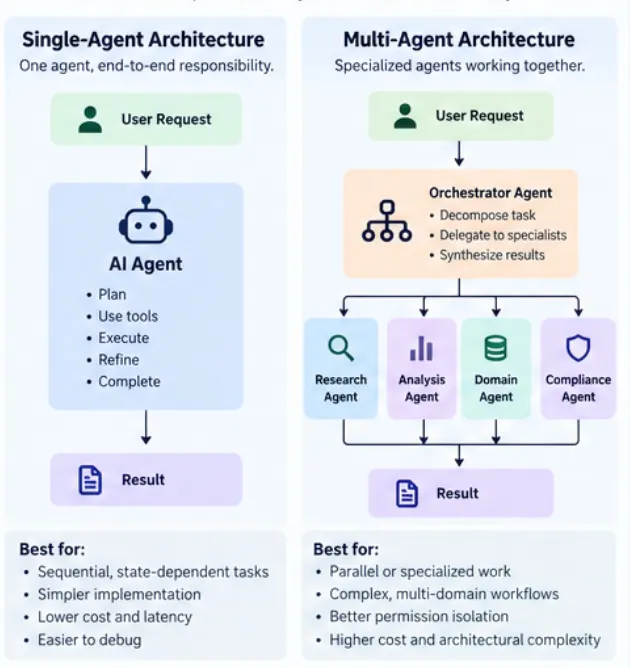
The important question for multi-agent orchestration is therefore not, “Is the task complex?” It is, “Does dividing the task create an architectural advantage?”
For example, if you are editing one codebase where each change depends on the previous change, several agents may create more chaos than value.
If you are conducting due diligence across legal, financial and technical documents, independent specialists can work in parallel and an orchestrator can synthesize their findings. That is a much stronger agentic AI workflow example for enterprise use.
There is another benefit of using multi-agent architecture: permissions. A finance agent can receive access to finance tools while a CRM agent receives access only to CRM functions.
But every handoff will create a context border, and across all such borders, information can be compressed, misunderstood or lost.
So for enterprise agentic AI, start with one agent where possible. Move to multiple agents when specialization, isolation or parallelism justifies the additional architecture.
Once you have chosen that architecture, you can harden it for production.
Also Read: Agent2Agent (A2A) Protocol: Guide to Enterprise AI Agents
Before you let an agent take live actions, I would work through eight controls.
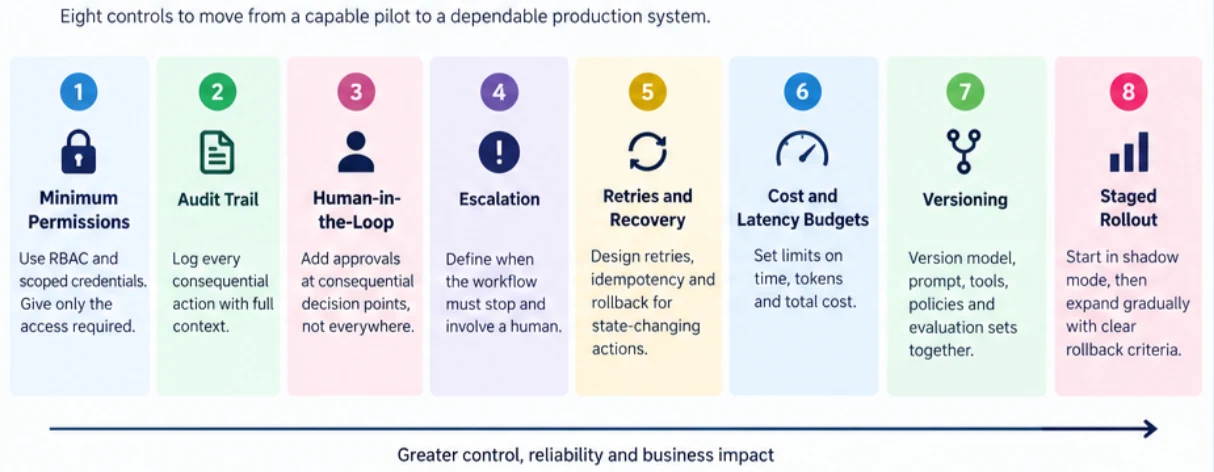
Use role-based access control and scoped service identities. If an agent only needs to read invoices, do not give it write access to the finance system.
Your audit trail should tell you what happened in a workflow. Capture the agent and prompt version, relevant model configuration, tool calls, parameters, execution result, timestamps and authority under which an action occurred. This will be essential when you need to investigate an unexpected production decision.
If you are considering how to add human-in-the-loop to AI agents, avoid putting an approval gate after every step. You will turn automation into another queue. Instead, identify consequential boundaries.
A human may not need to approve an agent that only reads the inventory database. You may want approval before it changes a large order, sends a regulated communication or issues a high-value refund.
You should define the exact conditions under which the agent must stop autonomous execution and hand the case to a person.
The agent should not respond to uncertainty simply by reasoning for longer. At some point, the workflow needs a defined exit path.
Retries are useful to overcome transient failures. [#technically unclear and imprecise language -They are dangerous when the operation changes state.
For example, if a payment API times out, blindly retrying can create a duplicate transaction. So, checkpoint workflow state, use idempotency where supported and define compensating or rollback actions for operations that may need reversal.
An agentic workflow can consume far more model calls than the original user request suggests.
One task may trigger planning, retrieval, several tool calls, retries and evaluation. In a multi-agent architecture, several agents may perform these steps independently.
Set explicit limits for execution time, model calls, token consumption, tool retries and total cost per workflow. If the workflow crosses those limits, it should stop or move to an escalation path rather than continue indefinitely.
Version the model configuration, prompt, tool schemas, policies, evaluation set and permissions together. Otherwise, when performance of the agentic AI powered workflow falters, you may not know what might have caused it.
Run a new workflow in shadow mode first, where it recommends actions but does not execute them. You can then compare those recommendations with actual human decisions and measure where the workflow performs well or fails.
Once the results are acceptable, expose the workflow to a limited percentage of users, transactions or use cases. Expand that scope only after the new version meets predefined quality, latency, cost and safety thresholds.
In an agentic workflow, the place where you notice a problem may not be the place where the problem started.
That is why I would monitor signals as well as final outcomes.
Take the example of purchasing workflow wherein an AI agent submits a purchase order to a supplier system.
The agent sends the request, but the supplier API times out before returning a confirmation. At this point, the workflow has an important ambiguity: the request may have failed, or the supplier may have accepted it without returning the response.
If the agent simply repeats the call, it could create a second purchase order.
A production workflow should therefore treat the timeout as an unknown transaction state. It should first check whether the original order exists, using a transaction reference or idempotency key where available. Only if the system confirms that the order was not created should the workflow retry the request.
If the transaction state cannot be established reliably, the workflow should stop and escalate the case.
There are many agent frameworks for building agentic AI workflows for enterprises. The list will keep changing. I can recommend a few here, but I would choose one based on my architectural requirement rather than the popularity of the framework.
Think about your stack in layers.
For AI workflow automation, orchestration should make the workflow easier to understand and control. It should make state transitions, branching logic, tool calls and failure paths more explicit.
If you need predictable branching and durable state, a graph-oriented approach may suit you. If you have clearly separated specialist roles, a role-oriented framework may fit better.
In some cases, your existing application services with a relatively thin agent orchestration layer may be all you need.
The principle I would leave you with is simple. Your agentic workflow architecture should become more complex only when that complexity solves a real production requirement. If the framework adds more moving parts than the workflow itself requires, you are probably moving in the wrong direction.
At Neuronimbus, we work with technology teams on exactly this part of the problem: deciding where agentic AI adds value, and then designing the application, integration and control architecture needed to run it reliably in production.
If your organization is ready to move from agentic AI experimentation to production, we should talk.
Strong agentic AI workflow examples for enterprise include IT incident investigation, procurement analysis, complex customer-service resolution, software maintenance and multi-source due diligence
Avoid agentic design when a process is fully deterministic, extremely latency-sensitive or can be implemented more reliably with conventional software.
Compare total operating cost with measurable workflow impact: labour hours removed, cycle-time reduction, higher throughput, fewer escalations or revenue improvement. Include model inference, infrastructure, monitoring, human review and ongoing evaluation rather than counting API costs alone.
Yes, if the legacy system exposes a reliable integration surface. That might be an API, service layer, message queue or controlled automation interface.
It depends on differentiation and control. Buying can accelerate common capabilities such as orchestration and observability. Building becomes more attractive when workflow logic, data integration, security requirements or domain behaviour are distinctive.
Build evaluation sets from realistic cases, including normal requests, ambiguous inputs, missing data, tool failures and adversarial conditions. Test both final outcomes and execution trajectories so a correct answer produced through an unsafe path still fails evaluation.
Do not stop at model accuracy. Measure task completion, straight-through processing, human intervention, cycle time, cost per successful task and business-specific outcomes.
Re-evaluate whenever prompts, models, tools, policies or important upstream data change, and continuously sample production runs. Agent behaviour depends on the surrounding system, so a previously validated workflow can regress without its business objective changing.

Let Neuronimbus chart your course to a higher growth trajectory. Drop us a line, we'll get the conversation started.






Call Us

Schedule a Call


Your Next Big Idea or Transforming Your Brand Digitally
Let's talk about how we can make it happen.