Most conversations about ecommerce chatbots start in the wrong place. They start with the tool, the vendor demo, the shiny widget. I’d like to start somewhere more useful: with what the thing actually does for your store, and where the money comes back.
An AI chatbot for ecommerce answers product and order questions, recommends items, and recovers abandoned carts, around the clock. The return comes from two places: the support costs you stop paying, and the sales you stop losing. For most stores, that adds up to positive ROI within three to six months.
That’s the promise. Now let me walk you through it.
I would define an AI chatbot for ecommerce as a digital sales and support assistant that is embedded in an e-retailer’s storefront, help desk, and the messaging channels the e-store’s customers use, like WhatsApp and Instagram.
That's a somewhat simplified definition, and there’s a longer and more interesting definition too, because in the last three years, AI chatbots for ecommerce stores have evolved from ‘something that answers’ to ‘something that answers and takes actions’.
The previous generation of AI chatbots actually worked on the basis of complex decision trees and keyword scripts. So, for instance, while using such a chatbot, an e-store’s customer would type "refund," the chatbot would match the word against its database, and based on the match gave the shopper the link to the refunds policy page.
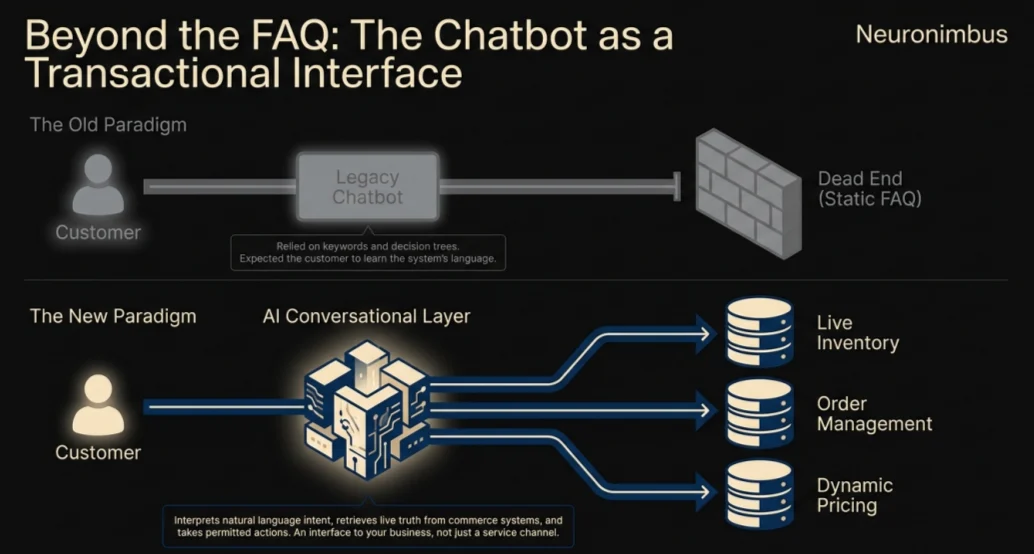
A modern AI chatbot for ecommerce works differently. Such a chatbot uses large language models and natural language processing to read the user’s intent and sentiment, and the context of the conversation, using which it responds to what the user actually means rather than the exact words they happened to type.
A good AI chatbot can do four exceptional jobs for your ecommerce store.
Notice that each of these four jobs that an AI chatbot for ecommerce can do are located on a specific point of friction for the user/shopper. So an important question is which jobs are worth giving to an AI chatbot first.
Also read: AI in E-Commerce: Transforming Online Shopping
Think of your shopper's journey as a line that runs from first curiosity all the way to a repeat purchase. The best ecommerce chatbot examples can be imagined as milestones on that line.
When you put a large catalogue in front of a shopper, you often give them decision paralysis instead of choice. Here, your AI chatbot can act like a good salesperson on the floor. It can tell the shopper what they actually want, and filter the options internally by budget, by occasion, by fit, and then narrow the catalogue further down to a handful of items that the shopper would be likely to buy. This level of guided product discovery is not something that a search bar or filtering mechanism can do. This is AI for online shopping at its most useful, and it can massively boost your e-store’s conversion rate.
This is where a cart abandonment AI chatbot can be vital. Such a chatbot can watch for the signals that reveal that a shopper is about to leave. The signals could be anything like a long pause on the checkout page, the mouse drifting toward the exit, the tell-tale back-and-forth of price comparison. When the bot sees this behavior, it can step in while the shopper is still on the page, and offer help, free shipping, or a small discount.
You don't want to show the same offer to everyone, because not everyone needs the same nudge, and some of them will buy anyway. Your chatbot can distinguish between the shopper segments and respond accordingly:
In this way, the same AI chatbot can use two different levers, and protect your margins while improving sales.
An order tracking chatbot can handle the high-volume yet basic queries that customers have. In fact, I want to be direct with you about why this one capability matters most of all.
Of every use case an AI chatbot can serve in ecommerce, post-purchase support is the one that pays back the fastest. The payback is not dependent on the chatbot generating any new revenue. The chatbot simply removes the highest-volume, most repetitive tickets your team is answering. If you start nowhere else, start here.
For products with a natural replacement cycle, the chatbot can help customers reorder at the right time.
For more complex products, it can answer setup questions, suggest compatible accessories or help solve common problems after delivery.
That matters because the same conversational layer can support both service efficiency and future revenue.
Also read: Revolutionizing E-commerce with Machine Learning
Whenever someone tells me their AI chatbot for ecommerce has a wonderful ROI, I ask them one question first: from where is this ROI coming exactly? Because the ROI of an AI chatbot for ecommerce can come from two different places, and if you can't tell me which one you're counting, I can't trust your number, and neither should you.
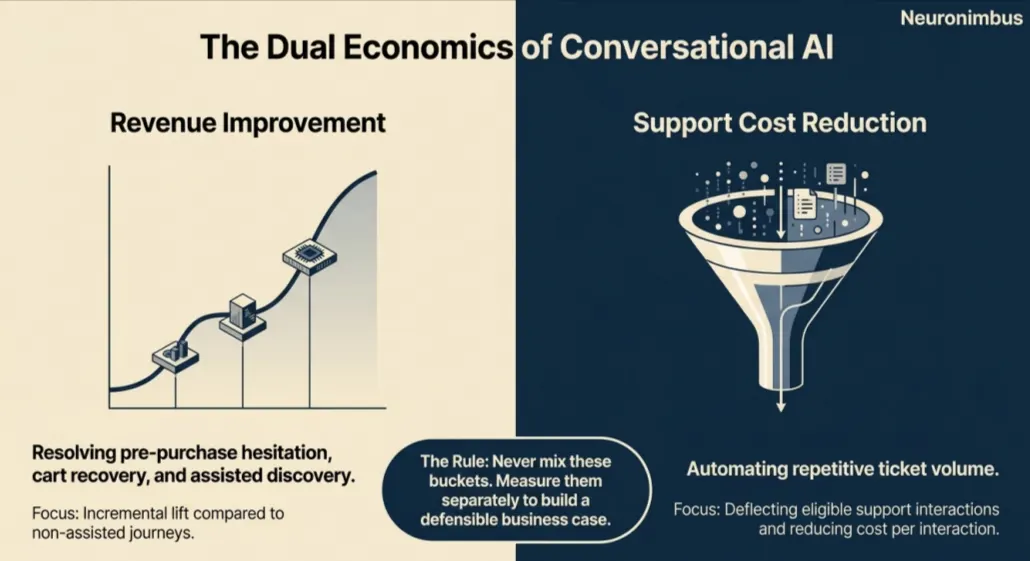
I would separate chatbot ROI into two buckets: Revenue improvement and operating-cost reduction.
An AI-powered ecommerce chatbot can improve revenues by removing friction from user journeys.
A chatbot can contribute by:
However, I do not mean to suggest that you should attribute all sales to the chatbot only on the basis of whether it was used in a conversation that led to an order.
1,000 customers may interact with your e-store’s chatbot, and out of those, 100 may buy something, but we can never say that these 100 would not have bought anyways.
What matters more is the incremental lift compared with customers who had a similar journey without chatbot assistance.
That distinction becomes important but is hard to capture in analysis.
The second component of an AI powered ecommerce chatbot is one that is easier to observe.
If thousands of customers repeatedly ask about order status, delivery dates, return eligibility or basic product information, those conversations must be consuming significant human support capacity, and that capacity has a cost.
When you automate those conversations, you also change the economics of the process.
The saving is not simply “number of chatbot conversations × cost of a human ticket,” because not every automated conversation would necessarily have become a support ticket.
A more defensible calculation would be one that looks at the volume of eligible support interactions and the proportion that the chatbot is able to resolve without human involvement.
For many businesses, this is where the first financial case for AI in e-commerce becomes easy to prove.
You do not need the chatbot to transform the entire customer journey. If it can reliably remove one high-volume support workflow or improve one commercially important point in the buying journey, you already have something measurable.
The next step is to put numbers against that value without giving the chatbot credit for revenue or savings it did not actually create.
Also read: E-commerce Digital Transformation
The honest way to measure this is by incremental net benefit, not by every sale that happened in a user session that also involved a conversation with the chatbot. If you credit your bot for each order it brushes against, you'll get a flattering number and a wrong one, because many of those shoppers would have bought from your e-store anyway. So strip that out and work with two formulas.
On the benefit side, count only what you can defend, such as:
On the cost side, count everything, including your software fees, your usage and API overages, one to three hours a month of someone's time keeping the bot current, and your build cost spread across twelve months.
Here is a worked example of how you can calculate an ecommerce AI chatbot’s ROI.
On an annual basis, that's roughly $566,000 in benefit against $84,000 in cost, and the one-time build pays itself back inside the first steady month. Those are deliberately mid-range assumptions, and the conversion-lift figure is where your analysis will live or die.
I won't pretend there's a universal answer here, because there isn't. Your decision on whether to build or buy an ecommerce AI chatbot will depend on four things: how much conversation volume does your e-store handle, how deep your integrations need to go, how strict your data rules are, and what the unit economics look like at your scale.
Buying your AI chatbot off the shelf is the right call when:
Building your AI chatbot yourself becomes the right call:
In practice, most technology leaders at ecommerce companies settle on a hybrid approach where they use an off-the-shelf tool to handle the tier-one queries, and build a custom backend within their IT’s own security perimeter for the chatbot capabilities that depend on access to internal databases.
At a high level, the architecture of an AI chatbot deployment is similar across platforms, and it looks like this:
Customer → Chat interface → AI/orchestration layer → Commerce APIs and business systems → Response or action
In a robust deployment, the AI chatbot should not normally query a language model and hope the model knows the answer. Instead, it should be set up to retrieve current information from the systems that own that information.
For example, when a customer asks, “Where is order 78214?”, an order tracking chatbot should identify the customer, check whether they are allowed to see that order, retrieve its current status from the commerce or order-management platform, and turn the result into a useful answer.
A similar pattern works across cases where an AI chatbot is deployed on an e-store built on the major ecommerce platforms.

A chatbot for Shopify can typically connect through the platform via Shopify APIs and app integrations.
Depending on the use case, it may need permission to read:
Architects use a custom middleware layer to then decide which data should be passed into the AI conversation and which actions the chatbot is allowed to initiate.
WooCommerce integrations usually work through WordPress plugins, extensions and the WooCommerce REST API.
The important security principle is the same. A public chat interface should never contain privileged store credentials. If a request involves private order or customer information, it should be handled server-side after the customer has been appropriately authenticated.
Magento environments are more complex because in a large implementation on Magento, there may be multiple stores, regional catalogues, configurable products and custom backend systems.
The chatbot therefore should be set up such that it can understand more than a simple product feed. For instance, it may have to retrieve regional prices, inventory by location, customer-specific information or complex variant relationships.
Across all three platforms, I would separate read permissions from action permissions.
Reading an order status is one level of risk. Issuing a refund is another.
Changing an address, cancelling an order or applying a discretionary discount should generally require stronger authentication and tighter business rules.
Though the language model can understand what the customer wants, it is your transaction system that should still decide what is actually allowed.
I'd rather you hear the failure modes from me here than find them in production. Of course, none of these are reasons to avoid an AI chatbot for ecommerce. They are reasons to build it properly.
Every one of these is preventable with testing and a sensible architecture, which is exactly why your work doesn't end at launch. It begins there.
Keep an eye on three layers at once: whether the bot is accurate, whether your customers are happy, and whether the money is real.
The two you'll care about most for the business case are the cart recovery rate, which tells you whether your cart abandonment chatbot is really working, and the resolution rate, which tells you whether your order tracking chatbot and its tier-one siblings are truly carrying load.
And keep measuring conversion lift against that holdout, so what you report is a genuine machine learning impact on ecommerce and not a flattering coincidence.
If you take one thing from me, let it be the order you do this in. Don't start by choosing an ecommerce chatbot. Start by naming your most expensive point of friction, the "where is my order" tickets drowning your team, or the carts leaking at checkout. Then model the ROI honestly against a control group. And only then, with a real problem and a real number in hand, decide whether to build, buy, or run a hybrid, based on your volume and your integration depth.
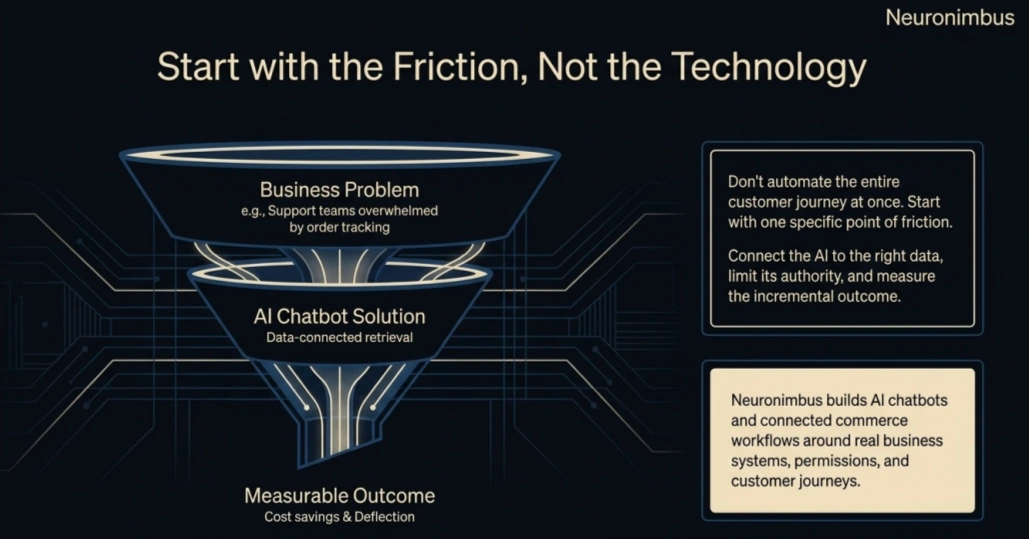
Done in that order, the tool very nearly picks itself. If you'd like a second pair of eyes on that sequence, the AI chatbot development team here at Neuronimbus does exactly this work.
They can, particularly when they resolve questions that would otherwise stop a purchase. However, a more useful measure is incremental conversion lift among comparable customers, rather than total sales from sessions that happened to use chat.
The cost of an ecommerce chatbot depends on whether you use a plug-in, a SaaS platform with custom integrations or a fully custom solution.
Yes. A cart abandonment chatbot can respond to a shopper’s hesitation around delivery, sizing, compatibility or price and help some customers complete the purchase. It should not default to offering discounts every time somebody pauses at checkout.
Many chatbot platforms offer Shopify integrations, and a custom chatbot for Shopify can also connect through Shopify APIs. The right choice depends on whether you need basic support automation or deeper access to orders, inventory, pricing and custom workflows.
There is no universal payback period. It depends mainly on support volume, automation rate, implementation cost and genuine conversion lift. The cleanest approach is to calculate monthly net benefit and divide the one-time implementation cost by that figure.

Let Neuronimbus chart your course to a higher growth trajectory. Drop us a line, we'll get the conversation started.






Call Us

Schedule a Call


Your Next Big Idea or Transforming Your Brand Digitally
Let's talk about how we can make it happen.