I’ve never known a business that outgrew its POS system overnight. It happens slowly. A workaround here, a manual export there.
Then one day you realize your checkout software can't talk to your inventory system without a middleware hack.
Your loyalty program runs on a completely separate platform.
And you're paying 2.5% processing fees on $2M a month in card volume.
That's the moment most CTOs start searching for custom POS software development. And in 2026, there are real reasons why this desire is spiking.
PCI DSS v4.0 compliance deadlines are forcing POS upgrade cycles across the industry. A Salesforce survey found that 34% of retailers say legacy POS is actively blocking their unified commerce initiatives. IDC projects 90% of retail tools will embed AI by end of 2026. And Google launched the Universal Commerce Protocol at NRF 2026, which means that POS systems that can't support agentic commerce APIs risk becoming invisible to AI-driven shopping within a few years.
So I have put this guide together with my team, to cover the full landscape: architecture decisions, feature tiers, system types, real cost data with TCO models, enterprise case studies, and the technology shifts that will reshape customizable point of sale software by 2028.
We've spent 20+ years at Neuronimbus building enterprise digital platforms, and this is the decision framework we'd want if we were on your side of the table.
Also read: Startup Mobile App Development: A Comprehensive Guide
The usual framing is binary: build custom or buy off-the-shelf. That's not how the decision actually works.
In practice, there are three paths:
You develop everything from the ground up.
McDonald's did this. They acquired the NewPOS source code in 2007 and brought the entire engineering team in-house.
Walmart built their Cloud Powered Checkout as a standalone microservices platform.
Nike spent years building a cloud-based, iOS-native POS that launched in 2025.
The appeal is that you own everything. Maximum control, highest cost, longest timeline.
You take an enterprise POS platform and reshape it around your workflows.
Starbucks runs on Oracle Simphony but with deep customization for their loyalty program, mobile ordering, and rewards engine.
Subway partnered with PAR Technology to build SubwayPOS on top of an existing framework.
The appeal of this model is that the POS is faster to market, but vendor dependency remains.
You assemble best-of-breed microservices — a commerce engine from commercetools, payments via Stripe Terminal, a separate CRM, a separate inventory service — all connected through APIs.
The MACH Alliance reports 92% of US brands have now implemented some form of composable commerce, with feature releases running 40% faster than monolithic alternatives.
So how do you choose?
It comes down to five variables:
The key lesson from every enterprise case study I’ve seen: there is no single right approach.
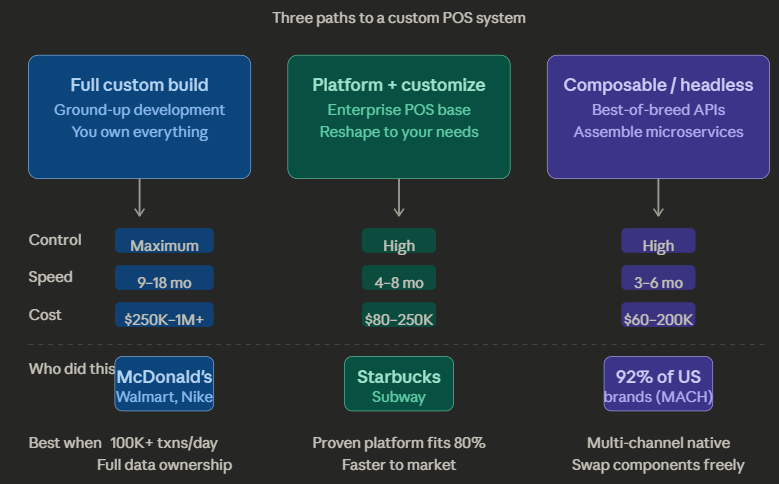
McDonald's acquired source code.
Starbucks customized Oracle.
Walmart built from scratch.
Chick-fil-A's philosophy is "buy when possible, build when necessary."
So the right answer depends on where your business sits on the control-versus-speed spectrum.
But regardless of which path you choose, you'll need to decide what type of system you're actually building.
Also read: Next-Gen iOS App Development for Business Growth
Not all POS systems are the same architecture under the hood. Here's how each type maps to a real business scenario.
Cloud-Native POS For multi-location chains that need centralized control and real-time sync. 72% of retailers and 83% of US restaurants already run cloud-based systems. Walmart's CPC is the most sophisticated example. It was built as domain-oriented microservices (Catalog, Cart, Checkout, Payment, Inventory) running on Azure and GCP with Kubernetes orchestration.
Edge-Hybrid POS For high-volume environments where latency kills revenue. Transactions process locally, sync to cloud in the background. McDonald's runs Google Distributed Cloud in hundreds of US restaurants. This means data is processed in-restaurant, not round-tripped to a data center. Chick-fil-A runs lightweight Kubernetes (K3s) on Intel NUCs for what they call "cloud-optional" computing. IDC projects 78% of retailers will adopt hybrid edge-cloud setups by 2026.
Mobile POS (mPOS) For tableside ordering, pop-ups, field service, experiential retail. Chick-fil-A's iPad-based iPOS lets team members take orders face-to-face in the drive-thru line. They've hit 178+ customers served in a single hour. SoftPOS is accelerating this further, turning smartphones into payment terminals. Visa reports roughly 200% year-over-year growth in Tap-to-Phone adoption.
Self-Service Kiosk POS For labor optimization in QSR, hospitality, and healthcare. McDonald's has deployed self-service kiosks in over 15,000 stores. Hardware costs range from $1,500 for countertop units to $7,500+ for freestanding kiosks.
Headless / API-First POS For businesses where the custom point of sale software is just one node in a larger commerce architecture. The terminal consumes the same APIs as your web storefront and mobile app — same commerce engine, same inventory, same customer data. Built on MACH principles (Microservices, API-first, Cloud-native, Headless). 93% of retail organizations on MACH report positive ROI, and the headless commerce market is projected to grow from $1.74B to $7.16B.
So, the type of POS you choose shapes the foundation. But the real differentiator is always what you build on top of it.
Also read: Convert Website to Mobile App: Complete Guide
Goes without saying that every feature you add increases cost and timeline. So the real question isn't "what can a customizable point of sale software do".
It's "what do you build first, what do you add next, and what do you plan for."
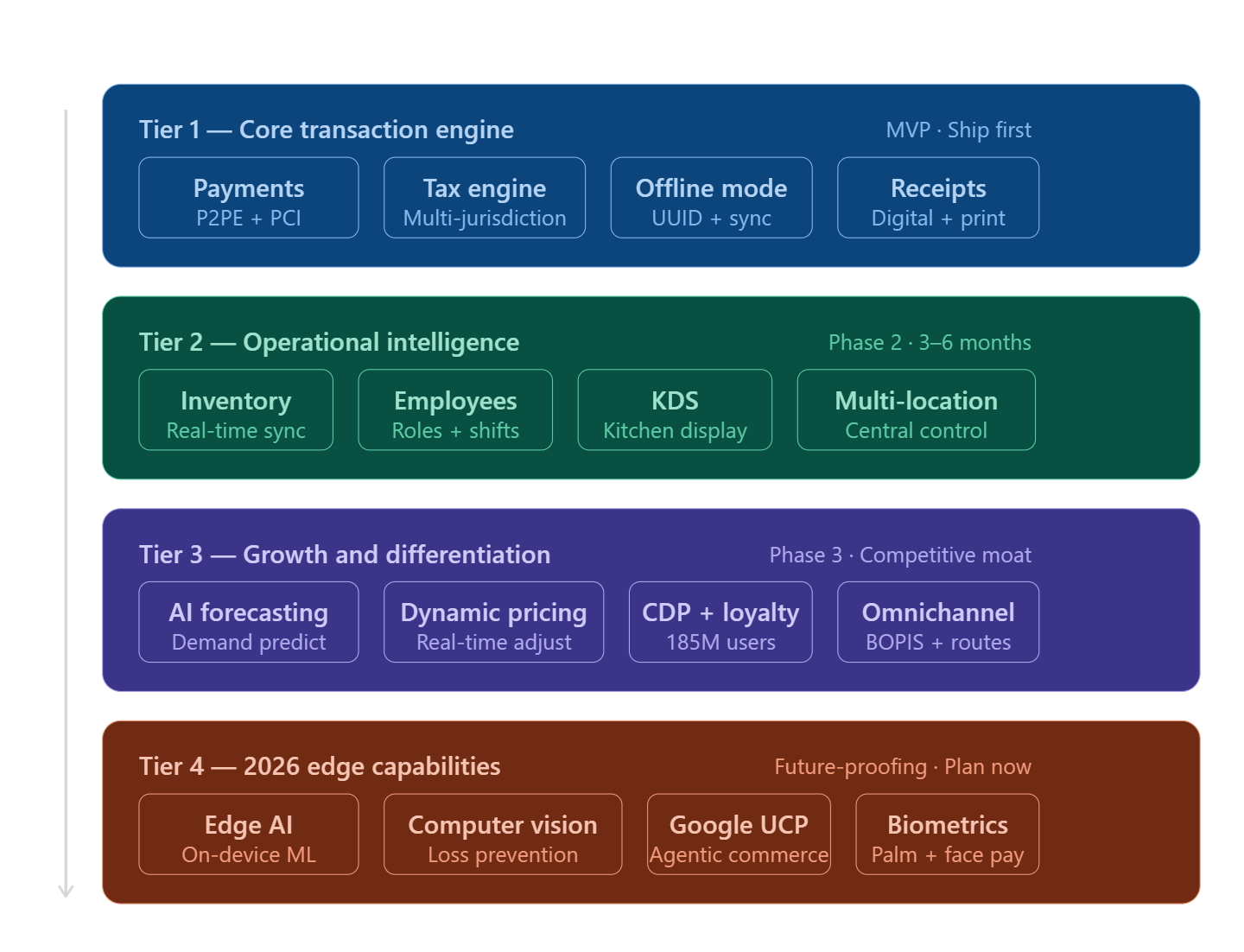
A good way is to think about this in four tiers.
This is what ships first. Without these, you don't have a working system.
Payment processing is the foundation. It is the part where architecture decisions have the biggest downstream impact. Your system needs to handle cash, card, mobile wallets, and BNPL.
The first hard question is how you handle card security. PCI compliance can mean 329 security controls if you do it the hard way. But if you implement something called Point-to-Point Encryption (P2PE), that drops to about 30 controls. That means for the same compliance, you have to do 90% less work.
The way it works: card data gets encrypted the instant someone taps or swipes, and it stays encrypted until it reaches the payment provider's secure servers. Your custom point of sale software application never sees the actual card number. Providers like Bluefin, Stripe Terminal, and FreedomPay handle this layer for you.
Tax calculation sounds simple until you're operating across jurisdictions. Subway runs 37,000+ locations across 100+ countries and every one with different tax rules. Don't build your own tax engine. Integrate with Avalara or Vertex.
Offline mode is non-negotiable. Your POS needs to keep working when the internet drops. The pattern: transactions save locally first, the screen updates instantly, and everything syncs to the cloud when connectivity returns. McDonald's entire NP6 system is built on this principle.
Once your transaction engine works, you build the systems that make the business smarter.
Real-time inventory sync across all locations and channels. Most SaaS POS platforms batch-sync inventory every 15–60 minutes, which creates ghost stock, breaks buy-online-pickup-in-store, and causes overselling. The solution is that you need instant updates, not hourly ones.
Employee management with role-based access, scheduling, and performance tracking. McDonald's tracks speed-of-service per station in real time. So if one station is lagging, the system flags it so managers can reallocate staff immediately.
Kitchen or warehouse display integration. Worth noting: in McDonald's system, orders hit the kitchen screen before payment completes. Food preparation starts the moment an item enters the system, not after the customer pays. That's how they serve millions per day.
This is where your custom POS software starts creating competitive advantage rather than just keeping the lights on.
AI-driven demand forecasting predicts stock needs by location, time, weather, and events. McDonald's "Ready on Arrival" starts food prep as customers approach the restaurant, cutting wait times by more than 50%.
Customer data and loyalty integration. McDonald's loyalty program has 185 million active users generating $20B+ in sales. Starbucks' Deep Brew AI personalizes offers based on order history, weather, and local events. The loyalty engine is your competitive moat, so we recommend you build this in-house.
Three things to plan for now, even if you don't build them yet.
Edge AI — running fraud detection and demand models directly on the POS terminal instead of sending data to the cloud. It's 78–91% cheaper than cloud inference, and it works offline.
Computer vision at self-checkout — 90% fewer scanning errors, 30% faster transactions.
Agentic commerce readiness. Google launched the Universal Commerce Protocol at NRF 2026 with Shopify, Target, Walmart, Mastercard, and Visa. It's an open standard for AI agents to discover and buy from businesses on behalf of consumers. POS systems that support these APIs become visible to AI shopping agents. Almost nobody in POS software development is talking about this yet, but it's the biggest architectural shift on the horizon.
With the feature architecture mapped, the next question is the one every CTO asks first: what does all of this actually cost?
Let's cut through the wide ranges you'll find elsewhere and break this down by what you're actually building.
A note on the low-end estimates ($8K–$25K) you'll see from some agencies, as those typically reflect junior developer rates or marketing entry points. US senior developers run $90–$150/hr. India-based senior talent runs $30–$50/hr for equivalent work. Always normalize against team geography.
Five cost amplifiers you actually control:
And plan for ongoing maintenance at 15–25% of the initial build cost annually. Over five years, maintenance will likely exceed what you spent building it.
Let's walk through a real scenario.
A 10-location restaurant chain doing $500K/month in card sales.
With a SaaS POS like Toast (2.49% + 15¢ per transaction), the 3-year total comes to roughly $511K. And here's the part most people miss: processing fees account for 90% of that number. The software license feels cheap. The transaction fees are where SaaS vendors actually make their money.
With a custom build at the same scale, the 3-year total runs $772K–$932K. That covers the initial development, ongoing maintenance at 20% per year, hosting, PCI Level 2 compliance, and payment processing at a negotiated interchange-plus rate around 1.8%.
At this scale, SaaS wins. It's not close.
But the math changes as you grow.
The gap between SaaS processing fees (2.5%) and what you can negotiate directly with processors (around 1.8%) gets wider with every dollar of transaction volume. At 15–25+ locations or $1M+ in monthly card sales, that difference alone saves $5K–$10K per month.
That's $60K–$120K a year. Every year. Flowing straight back to your business instead of to your POS vendor.
So the decision isn't really about whether custom is cheaper today. It's about whether your scale and growth trajectory will make the higher upfront investment pay for itself before SaaS processing fees quietly eat into your margins year after year.
Three different companies. Three different approaches. But one common thread: they all reached a point where off-the-shelf couldn't keep up.
McDonald's needed a system that could handle millions of daily transactions across 47,000 locations in 100+ countries. Orders come in from the counter, drive-thru, kiosks, and mobile apps, and the kitchen needs to see every one of them in under a second.
They acquired the NewPOS source code from a company called MediaWorks back in 2007 and brought the entire engineering team in-house. Over the years, they've paired that system with Google's edge computing infrastructure so data gets processed inside the restaurant, not in a faraway data center.
The results are hard to argue with. Digital channels now drive over 40% of sales in their top six markets. Their loyalty program has 185 million active users and generates $20B+ in sales. And their "Ready on Arrival" feature, where food prep starts as customers approach the restaurant, has cut wait times by more than 50%.
Walmart took a completely different angle. They didn't build a POS system. They built an e-commerce platform that happens to work at a physical checkout counter.
Their system, called Cloud Powered Checkout, is structured as a set of independent services: one for the catalog, one for the cart, one for payments, one for inventory, and so on. Each service can be updated or scaled without touching the others. The whole thing runs across two cloud regions simultaneously, so if one goes down, checkout keeps working.
It's now deployed in every US Walmart and Sam's Club across 19 countries, serving about 255 million customers per week. Sam's Club's Scan & Go mobile checkout is roughly 23% faster than traditional checkout, and one in three members uses it regularly.
Nike wanted something no existing POS vendor could deliver. They needed a single system that unified shopping carts, promotions, and membership loyalty across their physical stores and digital channels, with true offline support.
So they built it from scratch. Cloud-based, designed for iPhones and iPads, developed entirely in-house. Associates log in with a tap of their badge. Setting up a brand new store takes 25 minutes, down from 4 hours on the old system.
It's now rolling out across 1,000 stores and 50,000 associates. Nike's Global Product Leader called it "the most advanced, fastest, and most sophisticated POS system I've worked on."
The pattern across all four: POS isn't a checkout tool anymore. It's operational infrastructure. The enterprises winning on customer experience are the ones who own that infrastructure.
These companies were building for today's problems. But POS technology is shifting fast, and what you build now needs to survive the next three to five years.
The difference matters. Omnichannel connects your customer-facing channels but keeps backend systems in silos. POS, CRM, and inventory talk to each other through batch syncs, sometimes hourly. Unified commerce puts everything on a single data foundation. One source of truth, updating in real time.
IDC projects 90% of retail tools will embed AI by the end of 2026. The shift isn't just about adding AI. It's about where it runs. On-device inference costs 78–91% less than cloud, and it works without internet. The highest-ROI use cases: fraud detection at the terminal, dynamic pricing, and computer vision for loss prevention.
92% of US brands have implemented composable commerce. 93% report positive ROI. The idea: your POS terminal becomes just another API consumer alongside your website and mobile app. Same commerce engine, same inventory, same customer data. Feature releases run 40% faster than monolithic systems.
Launched at NRF 2026 with Shopify, Target, Walmart, Mastercard, Stripe, and Visa. It's an open standard that lets AI agents discover, browse, and buy from businesses on behalf of consumers. If your point of sale system software doesn't support UCP APIs, it won't be visible to agentic commerce. Still early, but so was mobile commerce in 2012.
Tap-to-Pay on smartphones is growing at roughly 200% year-over-year according to Visa. For many use cases, the dedicated payment terminal is becoming optional.
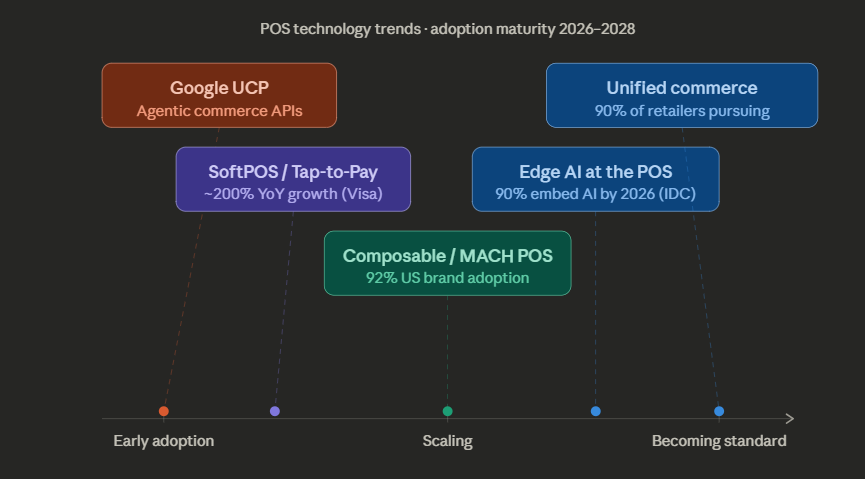
These trends are already alive in production environments today. The custom POS software development decisions you make now determine whether your system rides these shifts or gets replaced by them.
We've been building enterprise digital platforms for over 20 years for brands like KFC, Havells, and Nikon, where customer-facing technology isn't a support function, it's the product.
Also read: KFC's Digital Recruitment Revolution by Neuronimbus
The capabilities you should look for in a POS software development company map directly to what we do every day:
Our approach as a POS software development company: start with business process mapping, not a feature list. Build an MVP around the core transaction engine. Validate it in production. Then expand tier by tier.
Whether you're replacing a legacy system, building from scratch, or assembling a headless architecture from best-of-breed services — talk to our solution architects. We'll help you figure out which path actually fits your business.
You should consider custom POS when your transaction volume, integrations, or multi-location complexity start breaking SaaS limits—typically at 15+ locations or $1M+ monthly card volume.
Not initially. SaaS is cheaper upfront, but custom POS becomes cost-effective over time by reducing processing fees and licensing costs at scale.
A basic MVP takes 3–4 months, mid-level systems 6–9 months, and enterprise-grade POS platforms can take 9–18 months depending on complexity.
Core features include payment processing, real-time inventory, offline mode, CRM/loyalty integration, analytics, and increasingly AI-driven forecasting and automation.
It depends on your scale and control needs. Full custom gives maximum flexibility, while platform customization offers faster deployment with some vendor dependency.

Let Neuronimbus chart your course to a higher growth trajectory. Drop us a line, we'll get the conversation started.






Call Us

Schedule a Call


Your Next Big Idea or Transforming Your Brand Digitally
Let's talk about how we can make it happen.