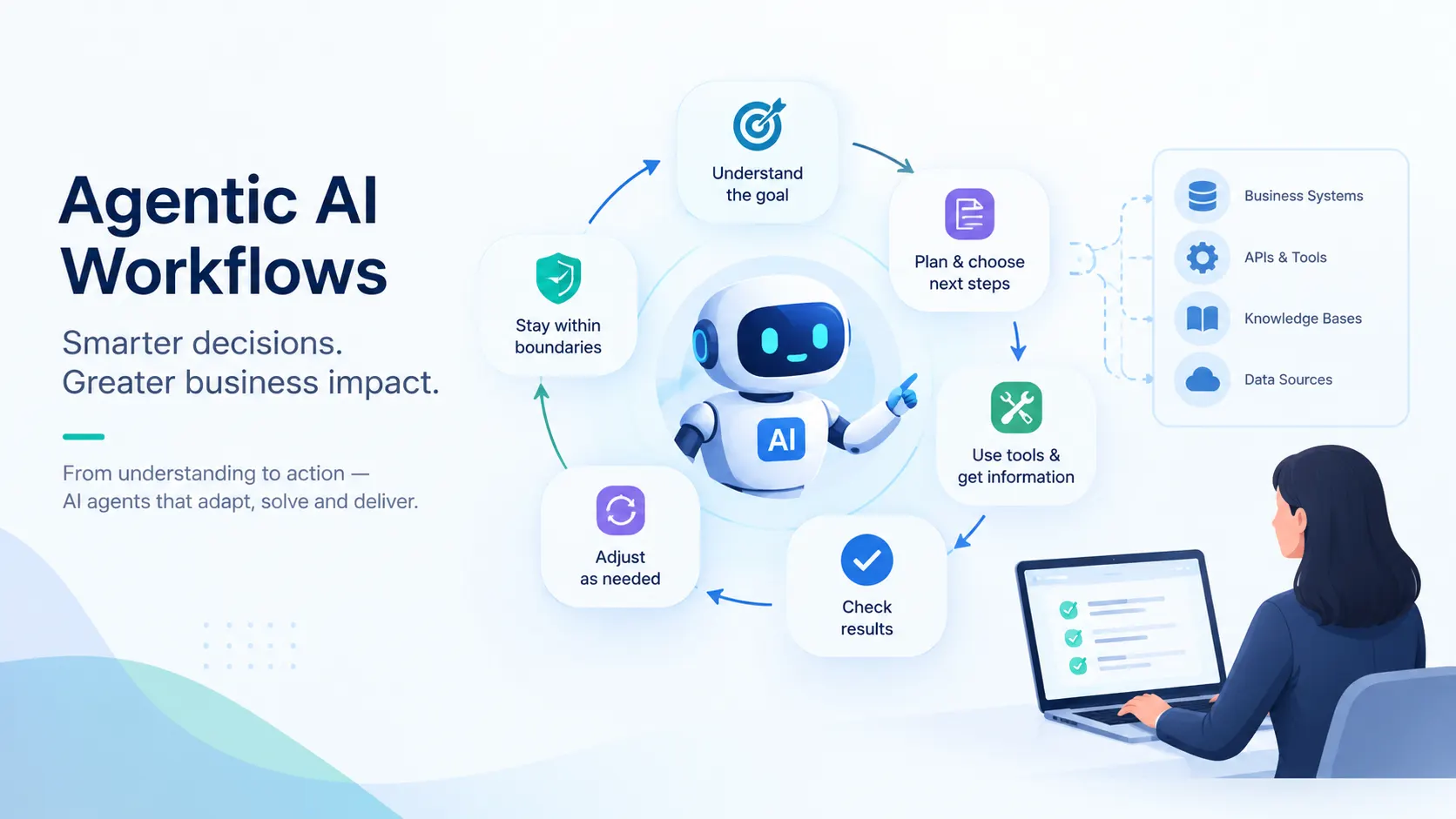
AI agentic workflows are processes in which an AI system works towards a goal by choosing actions, using tools, checking results, and deciding what to do next. Unlike traditional RPA setups, wherein the system follows scripted steps, an AI agent can adjust its approach as new information becomes available to it, all the while respecting the system boundaries defined.
If you already use automation in your business, you will probably recognise its limits. A process runs smoothly when the information arrives in the expected format and the next step is clear. When something does not match, someone often has to investigate before the process can continue.
An agentic workflow can help with that investigation. To understand where it would be useful, let us first look at how an agent decides what to do.
Suppose a customer writes to your support team: “My replacement order arrived, but you have charged me again.”
To act on this complaint, a support executive will need to check the original order, find the replacement shipment, and look at the payment records. Perhaps the second amount is a pending authorization. Perhaps it is a completed payment. Perhaps the customer is referring to a different order. What the executive will do, depends on their findings.
Now consider, can a system perform the same kind of support to a customer, without the involvement of a human executive?
An AI based agentic workflow could do that.
It helps to begin understanding agentic AI workflows from how leading technology companies define it.
IBM describes agentic workflows as “AI-driven processes where autonomous AI agents make decisions, take actions and coordinate tasks with minimal human intervention.”
AWS describes an agent as software that uses an LLM to understand context, plan actions, execute tasks, and adapt towards a defined goal. It also recognises that agentic systems can combine agents with conventional software.
Anthropic draws a distinction worth understanding. In its terminology, workflows follow “predefined code paths,” while agents dynamically direct their processes and tool use. So, a sequence containing several AI calls may still follow a route that a developer has prescribed.
Taken together, these descriptions help us identify the capabilities that are crucial for an AI agent to possess:
Based on that reading, my technical team lives by the following working definition of agentic AI workflows, at Neuronimbus:
An agentic workflow is a business process in which an AI agent works towards a defined outcome, choosing and adjusting its actions as it gathers information, while the surrounding software enforces permissions, limits, and approval requirements.
If you have invested in automation already, you may reasonably wonder how much of this is new and distinct from the traditional paradigms of automation such as robotic process automation (RPA) and fixed automation.
The agentic workflow vs RPA comparison becomes clearer when you ask: Who determines the next step at an intermediary stage in the workflow?
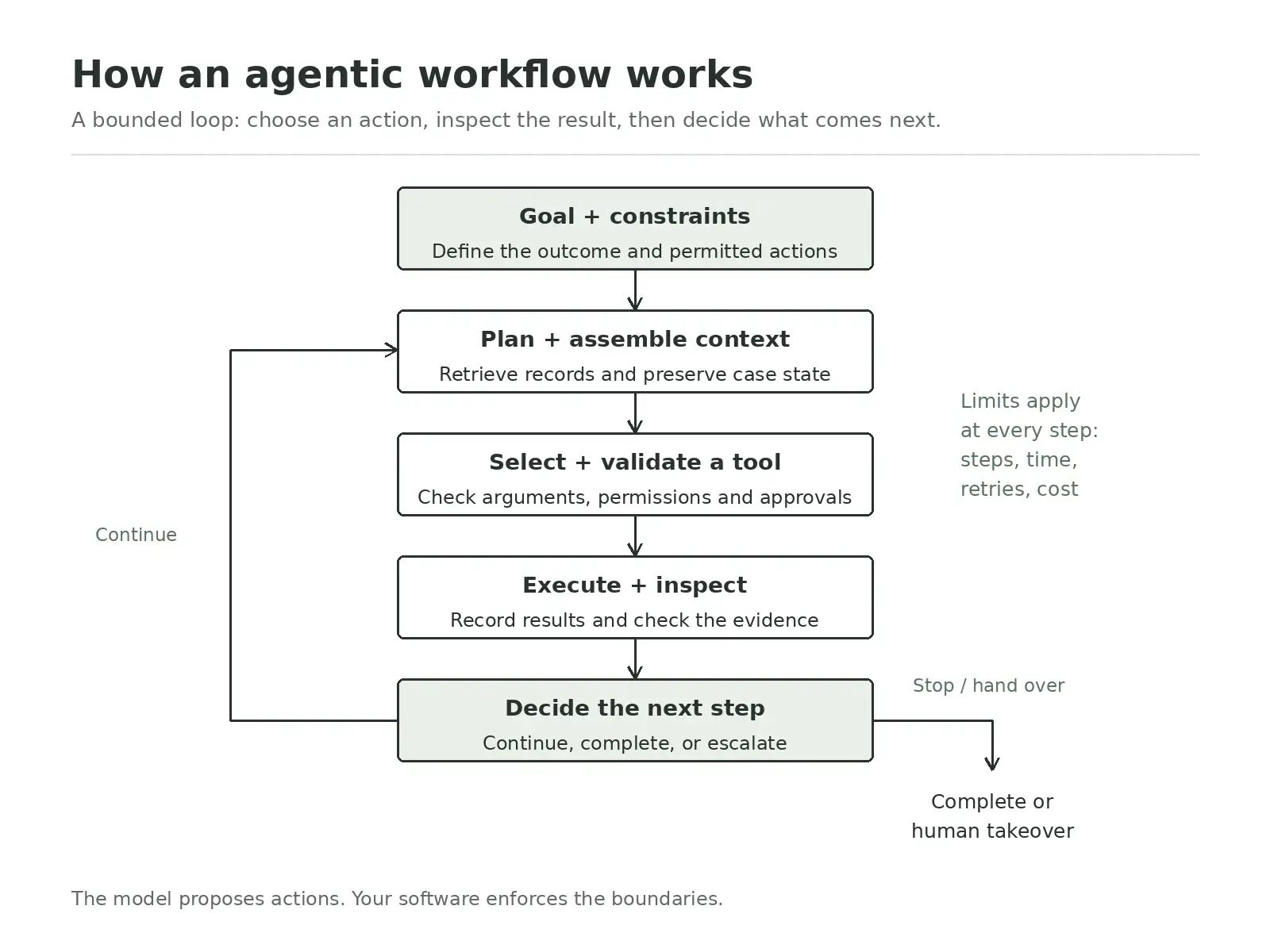
In a system based on agentic AI, the agent examines the information returned by each step and uses it to decide what to do next. It might retrieve another record, ask for clarification, or recommend an action. Your team defines which tools and actions it can use, but does not have to prescribe every possible sequence in advance.
The distinction matters when you decide how to automate a process. If your team can define the conditions and the corresponding actions reliably, rules-based automation may already meet your needs. An agent becomes worth considering when someone must investigate the available information before choosing the next step.
An agentic AI architecture brings together a reasoning model, business information, tools and software that coordinates execution of steps. Each component in the architecture has a different responsibility.
The basic execution loop is:
Goal → Context → Action selection → Validation → Execution → Result → Next decision
A workflow begins with a defined outcome, completion criteria and operating constraints. Together, these components tell the AI agent what it is trying to accomplish and which actions are available.
Your AI agent workflow design should therefore specify the scope, required output, approval requirements and execution limits.
Before choosing an action, the model needs information about the task, the business rules and the current execution state.
The context layer can combine:
Retrieval brings information into the model’s context. State management preserves progress, including completed actions, unresolved questions and pending approvals.
Using the goal and available context, the model determines what should happen next. It may retrieve more information, request a tool operation, prepare an output or seek human input.
The agent does not always need to construct a complete plan before starting. In fact, subsequent decisions can depend on results that were unavailable at the beginning.
Tools expose specific operations through APIs, database interfaces or other controlled integrations. The model requests an operation using structured arguments.
The application validates those arguments, checks permissions and applies any approval requirements before execution. Tool responses then return to the workflow as evidence for the next decision.
Orchestration software coordinates model calls, tool execution, state updates and human handovers. It also manages timeouts, bounded retries and recovery when a component fails.
This is what allows AI agentic workflows to pause and resume without losing progress.
The system checks whether the outcome meets completion criteria, whether another step is necessary or whether intervention is required. Model-based review can assist, while deterministic checks enforce requirements.
The following agentic workflow examples are valuable illustrations and each shows where information discovered during the process changes what should happen next.
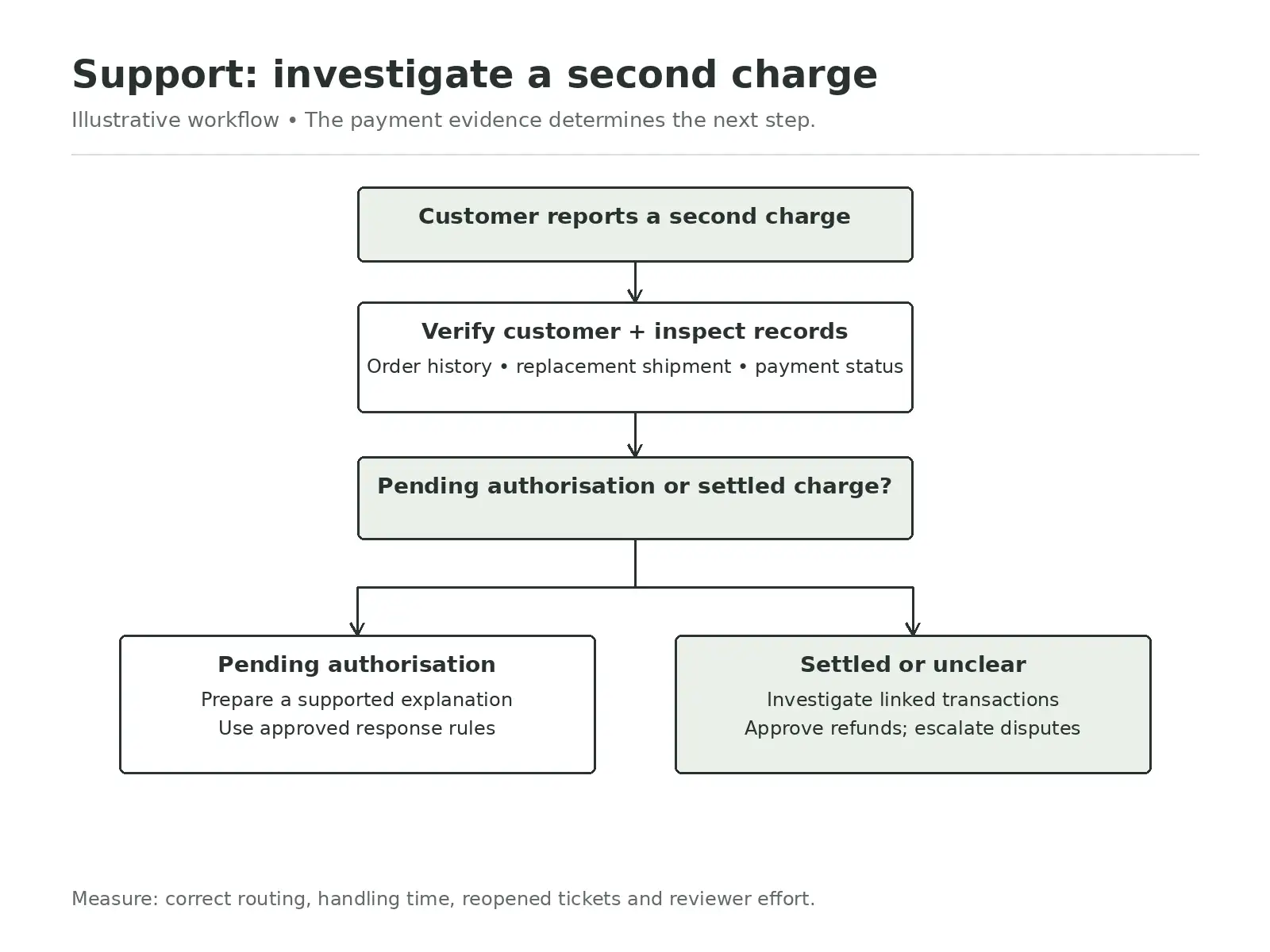
Trigger: A customer reports another charge after receiving a replacement order.
The agent first works through your customer verification process. It then retrieves the relevant details from the original order, replacement shipment, and payment records.
Suppose the second amount is a pending authorisation. The agent can prepare an explanation using the applicable policy.
If it is a settled payment, the agent must continue the investigation. It might check whether the charge belongs to the replacement, another purchase, or a duplicate transaction. If the records disagree, it should preserve that uncertainty and escalate.
Tools used: Support platform, order management system, payment lookup API, and approved policy repository.
Human approval: A support lead approves refunds and responses involving disputed evidence. Automatic replies could later be permitted for specific, verified situations.
Success measures: Correct routing, recommendation accuracy, handling time, reopened tickets, and reviewer effort.
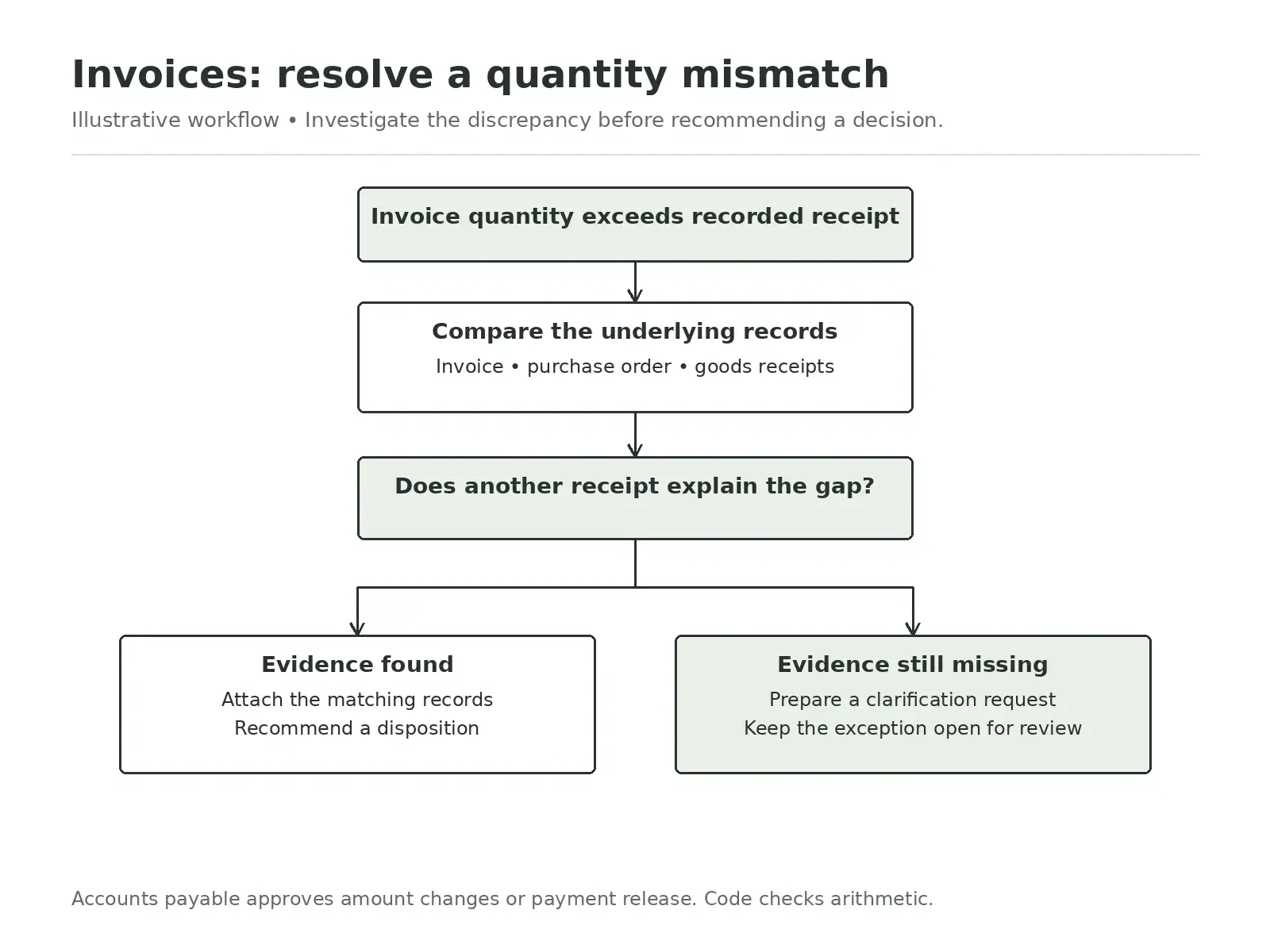
Trigger: The quantity billed exceeds the quantity recorded as received.
The agent retrieves the invoice, purchase order, and goods receipt, then identifies the discrepancy.
Imagine the invoice covers two deliveries, but only one receipt is attached to the purchase order. The agent could look for another receipt and check whether it belongs to the same transaction.
If it finds supporting evidence, it prepares a recommendation with the relevant records. If it cannot, it drafts a clarification request and leaves the exception unresolved.
Tools used: Document extraction, ERP lookups, receipt records, and an internal exception queue.
Human approval: Accounts payable approves changes to the payable amount or release of a held payment. Code performs arithmetic and duplicate checks.
Success measures: Investigation time, correct exception classification, reviewer acceptance, and incorrectly cleared invoices.
This example shows how AI agentic workflows can reduce the work needed to reach a decision while preserving financial controls.
Trigger: A new company enters your CRM as a lead, without enough information for qualification.
The agent checks for existing accounts and previous interactions before researching approved sources. It compares what it finds with your qualification criteria.
Perhaps two sources report different company sizes. The agent can consult another source or mark the information as uncertain.
That distinction matters. Your salesperson should be able to see which details are confirmed, estimated, or unresolved.
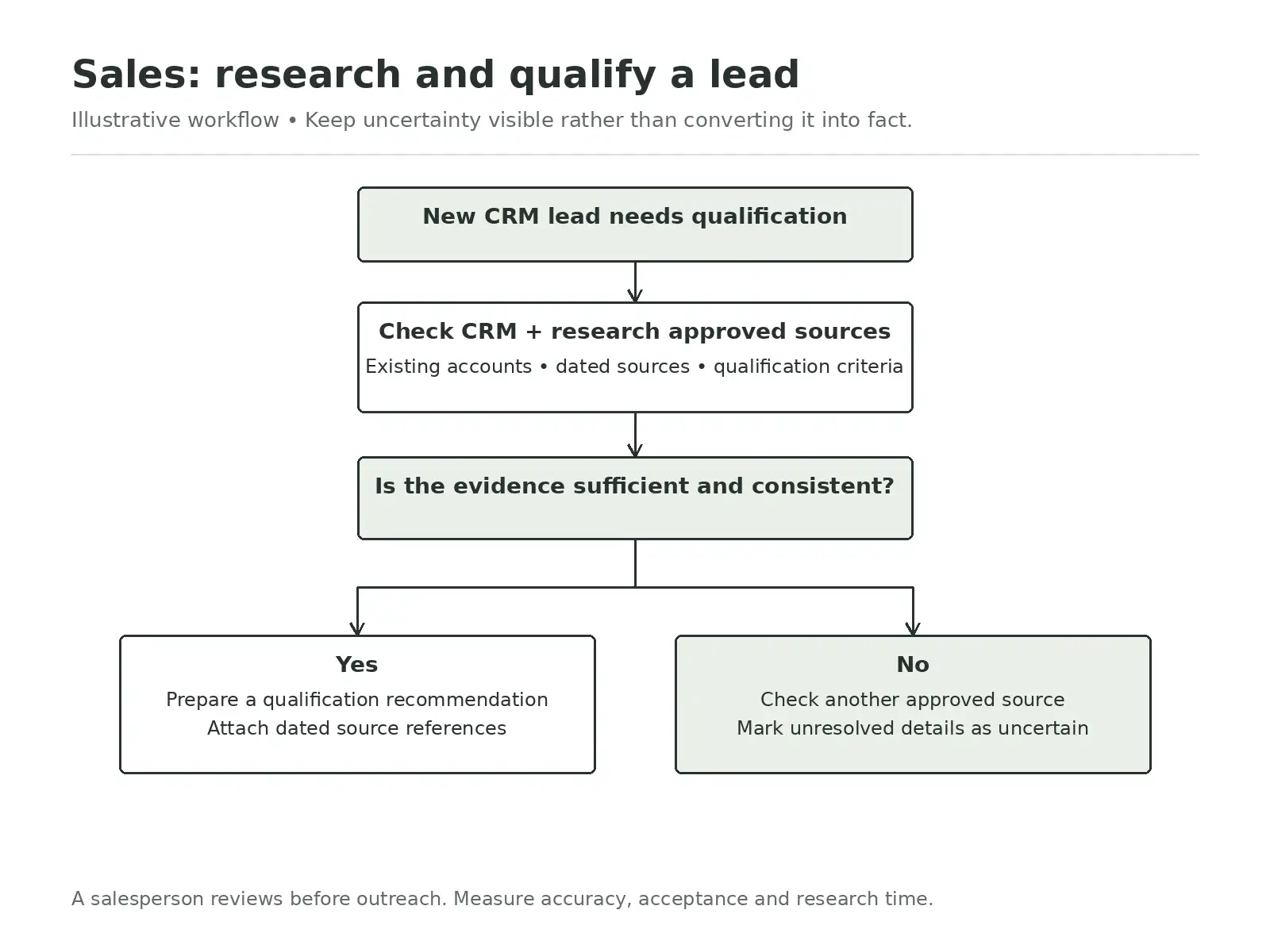
Tools used: CRM search, approved research sources, and qualification criteria.
Human approval: A salesperson reviews the recommendation before outreach or consequential account changes.
Success measures: Research time, factual accuracy, accepted recommendations, and unsupported claims.
Across these agentic workflow examples, the useful capability is choosing the next investigative step. That gives you a basis for selecting your first workflow.
I would begin with a question that can save your team considerable effort:
Does this process even need an AI agent?
If you can prescribe the steps reliably, fixed automation may be sufficient for the workflow. If you only need an answer from a collection of documents, a retrieval pipeline may meet the requirement.
An AI agent becomes worth considering when the next action at any stage in a workflow depends on what the system discovers, and the number of discoveries is not bounded, or too many to enlist and encode.
For your initial AI agent workflow design, you can use this simple scoring method. Give each factor a score from one to five, with five meaning greater suitability.
Using this scoring system, an illustrative support triage process might score:
A score of 17 out of 20 makes it worth investigating. It does not establish readiness.
If customer verification is unreliable, that problem still needs resolving.
Also ask the people doing the work whether the agentic AI powered version of the workflow would actually save them time. The best AI agentic workflows address a real difficulty without creating another burdensome queue.
I would approach AI agent workflow design through six practical decisions.
Define exactly what the agent is responsible for
Start by writing down:
That sounds basic, but it is surprisingly common to see teams begin with a prompt rather than a process definition.
If the agent is investigating one customer complaint, it probably does not need unrestricted access to your entire customer database.
If it only needs to read payment status, it does not necessarily need permission to create refunds.
Treat read permissions and write permissions separately.
And scope access wherever you can.
This makes the system safer, but it also makes failures easier to reason about.
There are some things a language model should not be responsible for deciding.
If an invoice total has to equal the sum of its line items, calculate that in code. If refunds above ₹5,000 require approval, enforce that in code. If an account number must contain a particular number of digits, validate it in code.
Use the model for interpretation and decision-making where language and context matter. Use conventional software for rules that should behave the same way every time.
The strongest agentic systems are usually hybrid systems for exactly this reason.
Test cases where:
Also test whether the agent took the correct actions, not merely whether it produced a convincing final answer.
When something goes wrong, somebody has to be able to reconstruct the workflow.
You should be able to see:
This becomes especially important when an agentic workflow spans several minutes or several systems.
You should also think carefully about what happens when a workflow pauses. If the process resumes tomorrow, the agent should know what has already been completed. It should not accidentally repeat an action because its earlier state was lost.
I would resist the temptation to move immediately from prototype to full autonomy.
A much safer progression is: offline testing → supervised use → approval-based execution → limited autonomous execution
At each stage, measure what happens.
How often is the agent correct? How often does a person change its recommendation? How much time does it actually save?
Autonomy should increase because the evidence supports it, not because the model appears impressive in a demonstration.
You will often hear the phrase human in the loop in discussions about AI agents. I find the phrase useful, but only if we are precise about what the human is actually doing.
There are at least three very different roles.
A person may approve an action before it happens.
A person may review work after the agent has completed it.
Or a person may take over because the agent cannot safely continue.
There are five failure patterns I would watch closely.
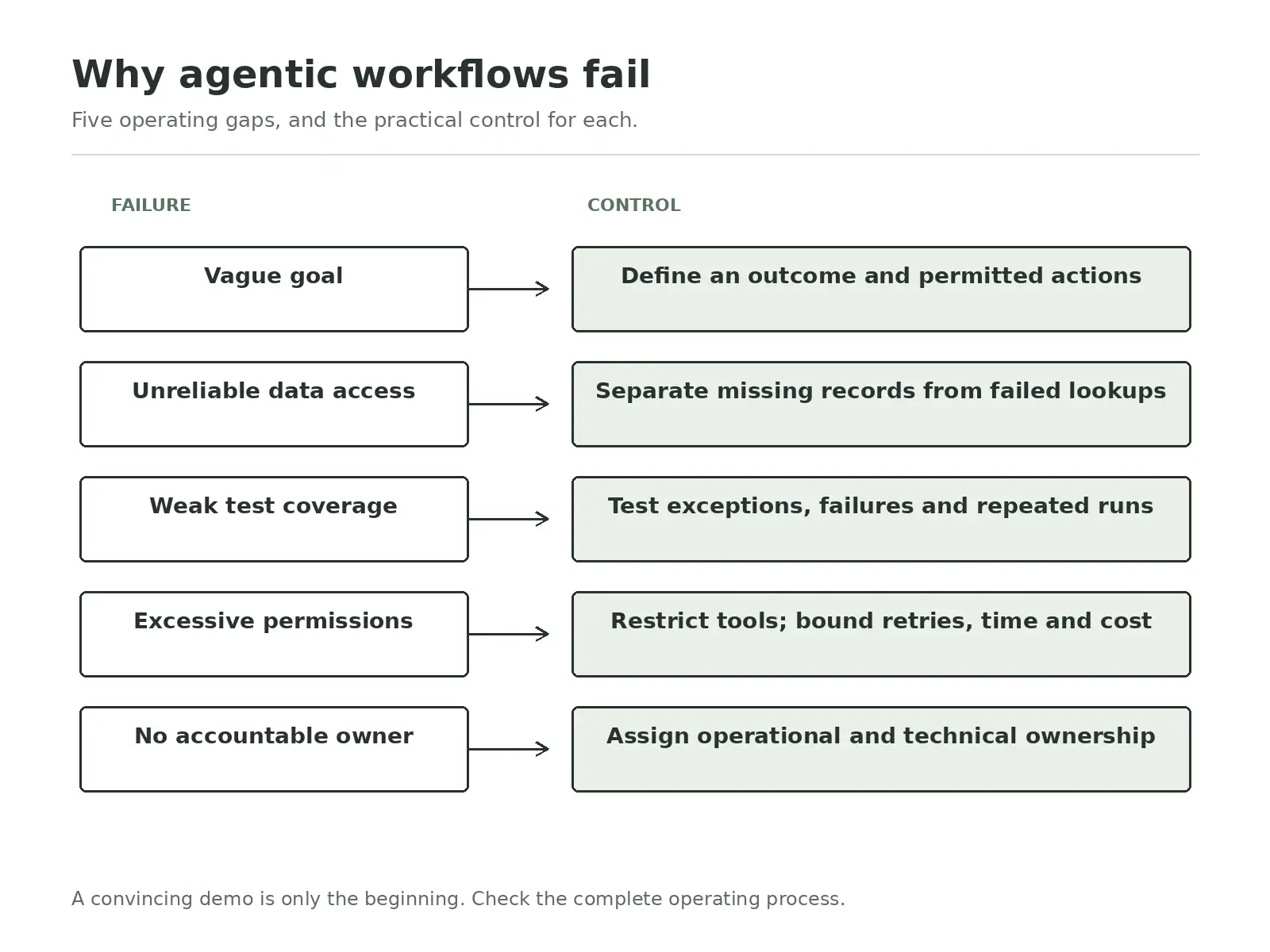
Something vague such as “Handle customer support” can not be an operational goal for an AI agent. Such a goal fails to specify the answers to many questions such as:
Which requests?
Using which systems?
What can the agent change?
What should it escalate?
What counts as a successful resolution?
If the objective is unclear, you cannot meaningfully test whether the agent is performing well.
Suppose the AI agent searches for a payment record and receives no result. What does that mean to the agent?
Does that mean the payment does not exist? Or did the payments API fail?
Either could be true, but those are completely different situations. Your architecture has to make that distinction visible.
This is one of the easiest mistakes to make.
We have seen deployment teams test an agentic AI workflow on ten examples, and all ten work, based on which the AI agent is released.
In the production environment, the same AI agent that worked flawlessly during testing now faces malformed records, ambiguous requests, unavailable APIs and edge cases that were never a part of testing.
Testing needs to include the difficult cases, because those are usually the cases in which autonomy becomes risky.
Broad permissions make agentic AI prototypes convenient, but they also make mistakes more consequential.
If the agent only needs to investigate an invoice, there is little reason for it to have permission to release payment. If it only needs to read a CRM record, it does not need permission to delete one.
So, start narrow and expand permissions only where the workflow genuinely requires them.
Agentic workflows are not “deploy once and forget” systems. So many things can change, such as models, policies, APIs, prompts, business processes, and what not.
Someone needs to own the system and be able to answer questions such as:
What are our failure rates?
Which cases are being escalated?
Which recommendations are reviewers overturning?
Has a recent model or tool change reduced performance?
Without that ownership, small problems tend to accumulate quietly and agentic AI workflows die an inglorious death.
I would not judge an agentic AI project by how autonomous the system looks in the demo.I would judge it by whether the workflow performs useful work reliably inside your business.
Start with one process where people repeatedly gather information before deciding what happens next.
Give the agent a clear objective.
Give it dependable tools.
Limit what it is allowed to do.
Create a useful human path for situations it cannot resolve.
Then measure whether the entire process, including reviews and corrections, is actually better than what you had before.
If it is, expand from there.
That is how I would think about custom AI agents and automation in production: not as an attempt to remove people from every process, but as a way of giving software more responsibility where the next step cannot always be scripted in advance.
If your organization is ready to move beyond experimentation, we should talk.
No. RPA usually follows predefined rules or scripted application steps. An AI agent can interpret information and choose among permitted next actions based on what it discovers. The two can also work together. An agent may investigate an exception while RPA executes a predictable downstream task.
Most production systems need a language model, orchestration logic, access to business systems, a way to preserve workflow state, permission controls and evaluation or monitoring tools. The exact technology matters less than whether these parts work reliably together.
A chatbot is primarily an interface for having a conversation. An agentic workflow is a way of completing work. A chatbot may give a user access to an agentic workflow, but an agent can also run in the background without any conversational interface.
A multi-agent workflow divides work between multiple agents with different responsibilities. For example, one agent might gather information while another checks the evidence. This can be useful for genuinely distinct tasks, but adding more agents also introduces more coordination, latency and failure points.
Test the full workflow, not only the final answer. Check whether the agent selected the right actions, used the correct tools, respected permissions, handled missing or conflicting information properly and escalated when required. Repeat evaluations whenever you change models, prompts, tools or business rules.


Let Neuronimbus chart your course to a higher growth trajectory. Drop us a line, we'll get the conversation started.






Call Us

Schedule a Call


Your Next Big Idea or Transforming Your Brand Digitally
Let's talk about how we can make it happen.